Introduction:
Choosing the Right Gaming Laptop for Kids in 2026
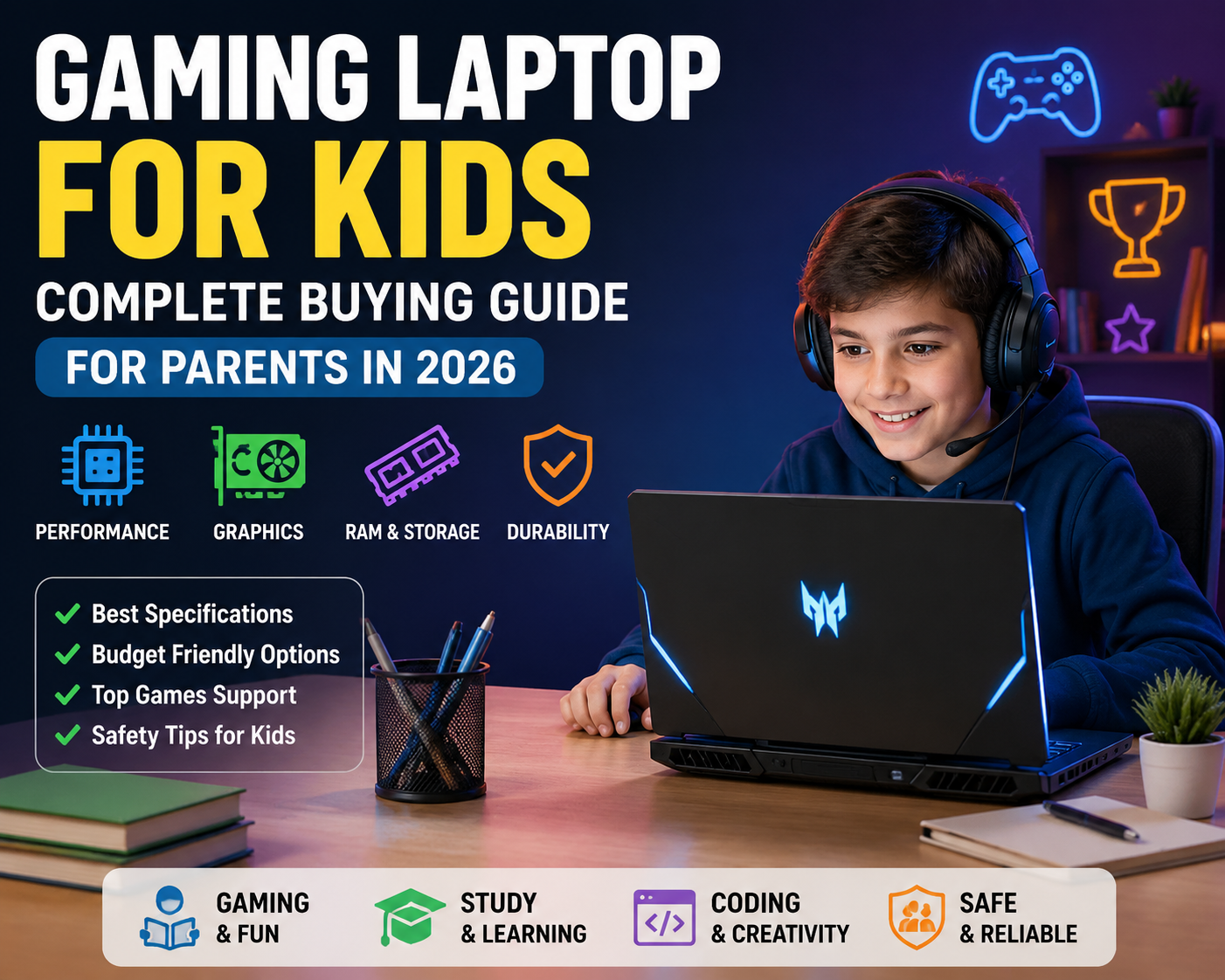
Children today are growing up in a digital-first world where laptops are no longer used only for homework. A modern laptop has become a tool for online learning, coding practice, creative projects, video editing, game development, and entertainment. From exploring Minecraft worlds to creating Roblox experiences, kids are using technology to learn and express their creativity.
However, choosing the right Gaming Laptop for Kids can be challenging for parents because the market offers hundreds of options with different processors, graphics cards, RAM sizes, and price ranges. Buying a laptop with too little performance may result in frustration, while spending too much on unnecessary features may not provide real value.
A good Gaming Laptop for Kids should provide a balance between gaming performance, educational needs, durability, safety, battery life, and future usability. Parents should not focus only on gaming power but also consider whether the laptop can support school assignments, coding classes, creative applications, and everyday activities.
In 2026, laptops are becoming smarter with AI-powered processors, improved graphics performance, better battery efficiency, and advanced features designed for students and creators. AI-enabled laptops are becoming more common, bringing features such as intelligent performance management, faster creative workflows, and enhanced user experiences.
This Gaming Laptop Buying Guide for Parents will help you understand everything you need to know before purchasing a laptop that is suitable for your child’s gaming, learning, and creative journey.
Table of Contents
What Is a Gaming Laptop for Kids?
A Gaming Laptop for Kids is a portable computer designed to handle both entertainment and performance-focused tasks such as gaming, coding, graphic design, video editing, and advanced educational software.
Unlike a normal laptop, gaming laptops usually include:
- More powerful processors
- Dedicated graphics processing units (GPU)
- Better cooling systems
- Higher refresh rate displays
- Improved keyboards
- Upgradeable memory and storage options
A regular laptop may easily handle activities like browsing websites, attending online classes, watching videos, and using productivity applications. However, gaming laptops are designed to handle heavier workloads where graphics performance and processing power are important.
For example:
- A student writing assignments may only need basic hardware.
- A child learning coding, animation, or game development may benefit from stronger specifications.
- A young gamer playing Minecraft, Roblox, or Fortnite will need better graphics performance.
The right choice depends on the child’s age, interests, learning requirements, and budget.
Why Do Kids Need a Gaming Laptop?
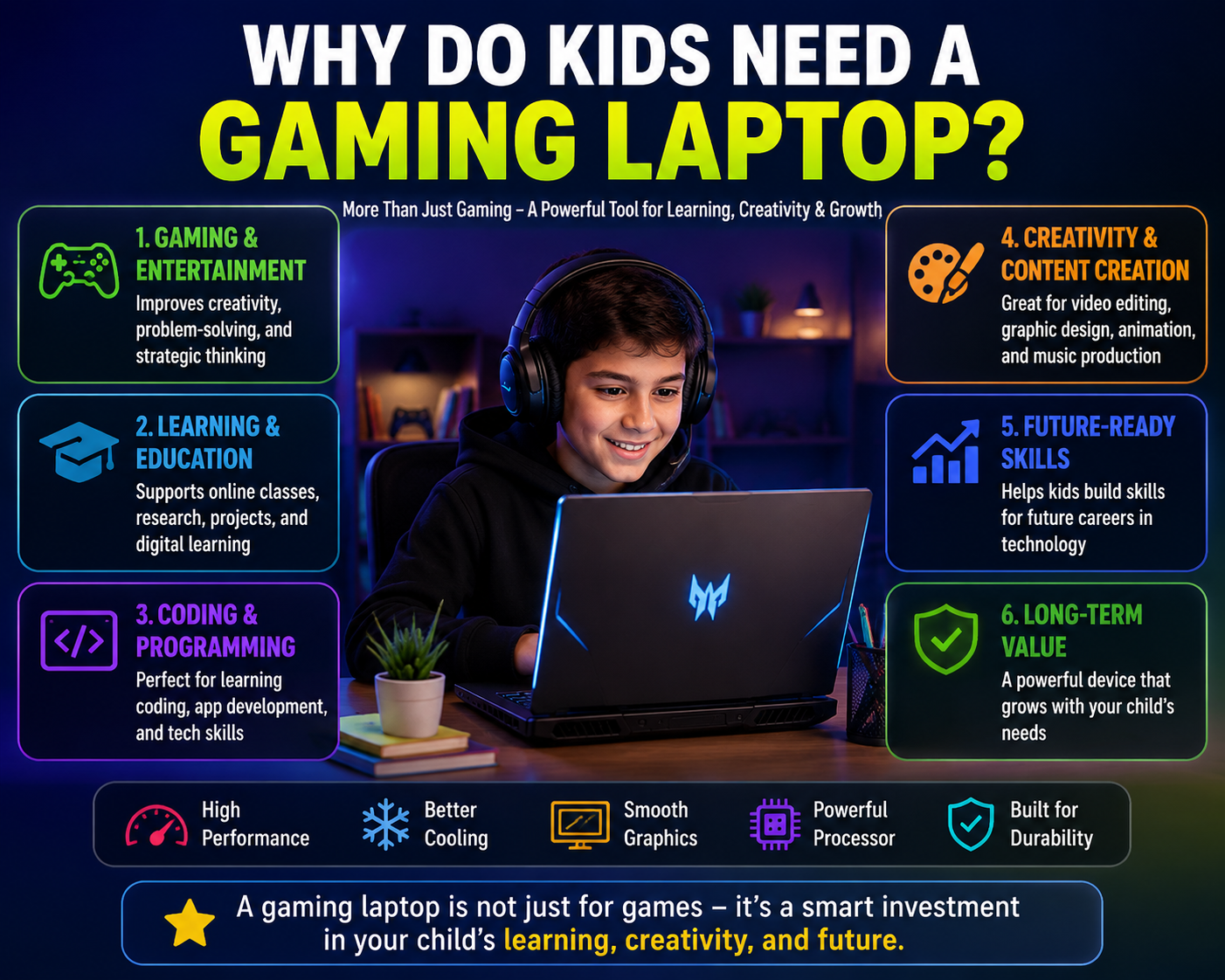
Many parents consider gaming laptops only as entertainment devices. However, a modern gaming laptop can support several productive activities beyond playing games.
1. Gaming and Entertainment
Games can improve creativity, problem-solving ability, strategic thinking, and teamwork skills when used responsibly.
Popular games among children include:
- Minecraft
- Roblox
- Fortnite
- Rocket League
- Esports games
- Educational simulation games
A capable laptop provides smoother gameplay, faster loading times, and a better overall experience.
2. Learning and Education
A gaming laptop can also become a powerful learning tool.
Children can use it for:
- Online classes
- Programming lessons
- Coding projects
- Robotics learning
- Artificial intelligence experiments
- Digital art
- 3D modelling
Many students who learn programming, animation, and content creation require more powerful hardware than a basic notebook laptop. GPU-equipped laptops are increasingly being used by students and creators because they support demanding applications.
3. Creativity and Skill Development
A Gaming Laptop for Students can help children explore creative skills such as:
- Video editing
- Graphic design
- Music production
- Animation
- Game creation
- YouTube content creation
A child interested in technology today may use the same laptop for learning professional skills tomorrow.
Important Things Parents Should Consider Before Buying a Gaming Laptop for Kids
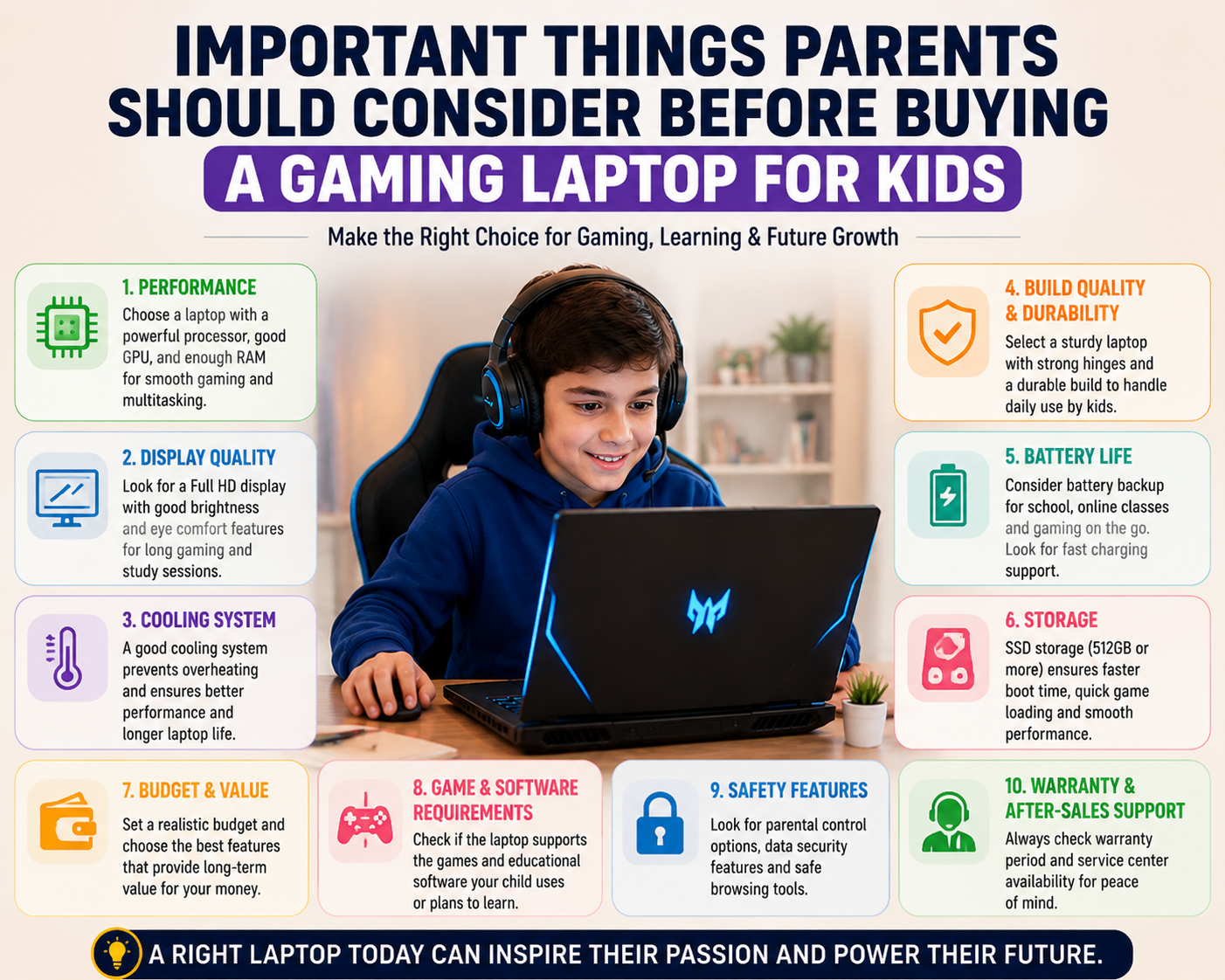
Before purchasing a Budget Gaming Laptop for Kids, parents should understand that expensive specifications do not always mean better value.
The ideal laptop should match:
- Child’s age
- Gaming requirements
- Educational needs
- Future learning goals
- Family budget
For example:
A 10-year-old child who mainly plays Minecraft and attends online classes does not need the same laptop as a teenager learning game development or video editing.
Understanding the Difference Between Gaming Laptop and Normal Laptop
| Feature | Gaming Laptop for Kids | Normal Laptop |
|---|---|---|
| Processor | More powerful CPUs | Basic to mid-range CPUs |
| Graphics | Dedicated GPU options available | Usually integrated graphics |
| Gaming Performance | Suitable for modern games | Limited gaming capability |
| Cooling System | Advanced cooling fans and heat management | Basic cooling |
| Display | Higher refresh rate options | Standard displays |
| Keyboard | Gaming-focused keyboards | Regular keyboards |
| Price | Usually higher | More affordable |
| Future Usage | Better for advanced learning | Suitable for basic tasks |
A normal laptop may be enough for:
- School assignments
- Browsing
- Video meetings
- Office applications
A Kid-Friendly Gaming Laptop is better for children who want:
- Gaming
- Coding
- Creative software
- Long-term performance
Current Gaming Laptop Trends for Kids in 2026
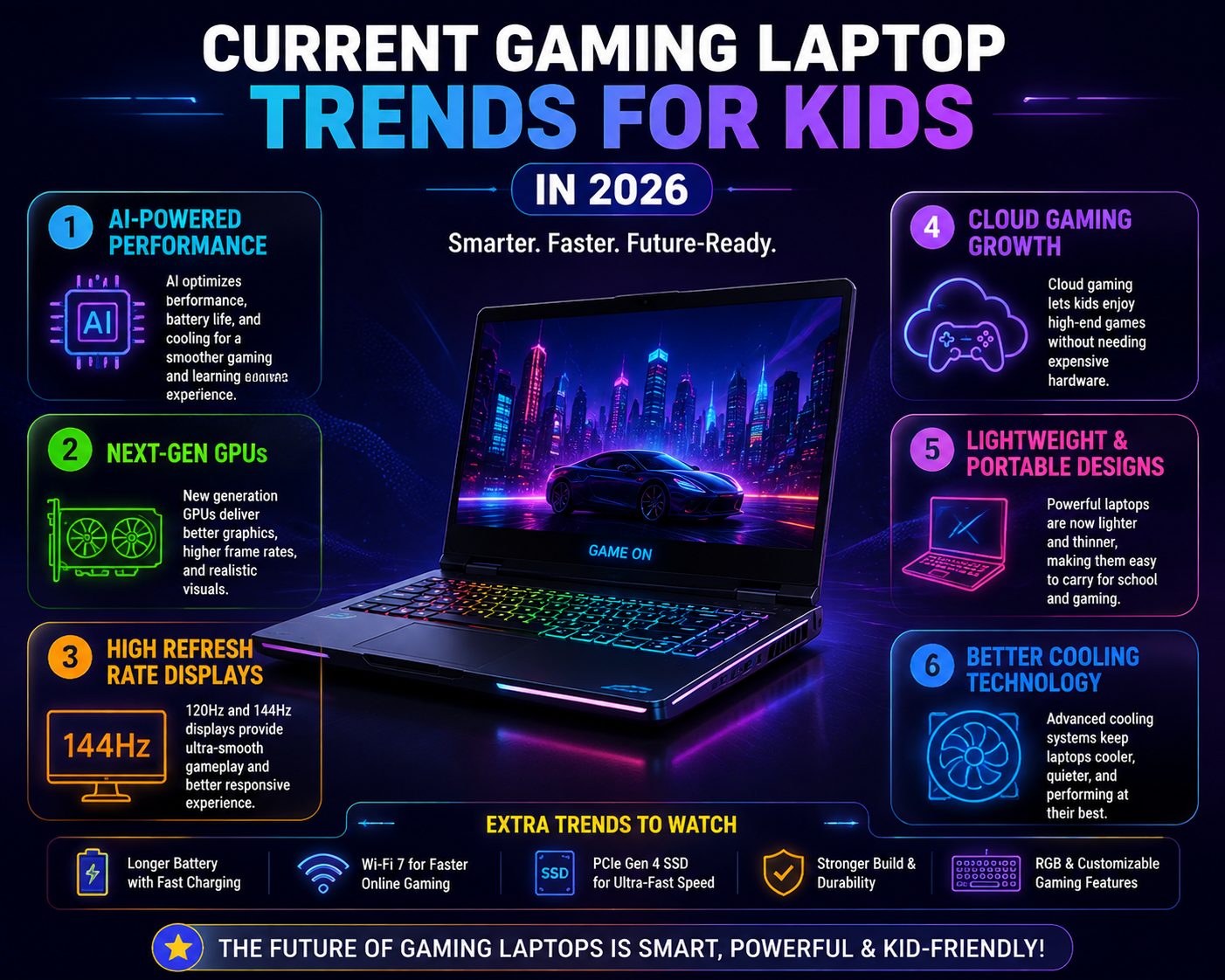
The laptop industry is changing rapidly, and parents should understand the latest trends before buying.
1. AI-Powered Laptops
AI features are becoming an important part of modern laptops. New-generation processors include dedicated AI processing units (NPUs) that help improve efficiency, smart features, and creative workflows.
For children, AI laptops can support:
- Faster learning applications
- AI-based creativity tools
- Smart performance optimization
- Better battery management
2. Better Graphics Performance
Modern gaming laptops are offering improved graphics performance with newer GPU technologies. This allows smoother gameplay and better support for creative applications.
Parents should understand that GPU performance is often more important than flashy gaming designs.
3. Cloud Gaming Growth
Cloud gaming is becoming more popular because it allows users to play games through internet-based streaming instead of depending completely on expensive hardware.
However, a good internet connection is required, and local gaming performance is still important for many children.
4. Gaming and Education Are Coming Together
The modern Laptop for Kids Gaming and Study is becoming a multipurpose device.
One laptop can support:
- School learning
- Coding
- Gaming
- Digital creativity
- Online courses
This makes choosing a balanced laptop more important than choosing only a gaming-focused machine.
Important Specifications to Check Before Buying
Important Features to Check Before Buying a Gaming Laptop for Kids
Choosing a Gaming Laptop for Kids is not only about selecting the most expensive model available. Parents should understand each hardware component and how it affects gaming, learning, and everyday performance.
A balanced laptop with the right combination of processor, graphics, memory, storage, display, and durability will provide better value and a longer usable life.
1. Processor (CPU): The Brain of a Gaming Laptop
The processor is one of the most important components of any laptop. It controls how quickly applications open, how smoothly games run, and how efficiently the system handles multiple tasks.
For a Gaming Laptop for Kids, a modern processor helps with:
- Faster game loading
- Smooth multitasking
- Online classes
- Coding applications
- Video editing
- Creative software
Intel Processor Options
Intel processors are widely used in gaming laptops and offer excellent performance.
Recommended options:
Intel Core i5
Suitable for:
- School students
- Casual gaming
- Minecraft
- Roblox
- Online learning
- Basic creative work
Intel Core i7
Suitable for:
- Teen gamers
- Video editing
- Programming
- Advanced multitasking
- More demanding games
Intel Core Ultra Series
Newer AI-focused Intel Core Ultra processors include dedicated AI processing capabilities, helping improve efficiency and smart computing features.
Suitable for:
- AI learning
- Creative applications
- Future-ready computing
AMD Ryzen Processor Options
AMD Ryzen processors are popular because they provide strong performance at competitive prices.
Recommended options:
AMD Ryzen 5
Good for:
- Budget gaming laptops
- Students
- Everyday gaming
- Learning applications
AMD Ryzen 7
Better for:
- Higher gaming performance
- Content creation
- Programming
- Advanced multitasking
AMD Ryzen AI Series
Designed for modern AI-powered computing experiences.
Recommended CPU Choice for Kids in 2026
| User Type | Recommended Processor |
|---|---|
| Beginner student | Intel Core i5 / AMD Ryzen 5 |
| Gaming + Study | Intel Core i5/i7 / Ryzen 5/7 |
| Teen gamer | Intel Core i7 / Ryzen 7 |
| Coding & Content Creation | Intel Core Ultra / Ryzen AI |
For most children, a good mid-range processor provides the best balance between performance and price.
2. Graphics Card (GPU): The Most Important Gaming Component
The graphics card is responsible for creating images, animations, and gaming visuals.
For a Gaming Laptop for Kids, the GPU determines:
- Game quality
- Frame rates
- Visual smoothness
- Video editing performance
- 3D design capability
Integrated Graphics vs Dedicated Graphics
Integrated Graphics
Integrated graphics are built into the processor.
Advantages:
- Lower cost
- Better battery life
- Less heat generation
Suitable for:
- Online classes
- Basic games
- Web browsing
- Educational applications
Dedicated Graphics Card
Dedicated GPUs have their own memory and processing power.
Advantages:
- Better gaming performance
- Higher graphics quality
- Better support for creative software
Suitable for:
- Minecraft with advanced settings
- Roblox development
- Fortnite
- Video editing
- 3D modelling
GPU Recommendations for Kids
| GPU Category | Suitable For |
|---|---|
| Entry-level GPU | Beginner gaming and students |
| Mid-range GPU | Gaming + creative learning |
| High-performance GPU | Advanced gaming and professional tasks |
A Budget Gaming Laptop for Kids does not necessarily need the highest-end GPU. A balanced graphics card with good cooling is usually a smarter choice.
3. RAM: How Much Memory Does a Gaming Laptop Need?
RAM allows the laptop to run multiple applications smoothly.
A child may use several applications together:
- Browser tabs
- Online classes
- Games
- Coding software
- Music applications
- Creative tools
Having enough RAM prevents slow performance.
8GB RAM
Suitable for:
- Basic gaming
- Online learning
- School work
- Minecraft
- Roblox
- Everyday use
Good choice for:
- Younger children
- Budget buyers
16GB RAM
Recommended for most users in 2026.
Suitable for:
- Modern games
- Video editing
- Coding
- AI learning tools
- Multitasking
For parents looking for a laptop that can last several years, 16GB RAM is the better investment.
RAM Recommendation
| Usage | Recommended RAM |
|---|---|
| Basic study | 8GB |
| Gaming + Study | 16GB |
| Coding + Editing | 16GB or higher |
| Advanced creative work | 32GB |
4. Storage: Choose SSD Over Traditional Hard Drive
Storage affects:
- Laptop startup speed
- Application loading time
- Game loading speed
- File transfer speed
Modern laptops should ideally use SSD storage.
SSD Benefits
A solid-state drive provides:
✓ Faster boot time
✓ Quick game loading
✓ Better reliability
✓ Less noise
✓ Lower power consumption
Recommended Storage Capacity
512GB SSD
Best choice for most kids.
Suitable for:
- Games
- School files
- Applications
- Videos
1TB SSD
Better for:
- Multiple large games
- Video editing
- Creative projects
Storage Recommendation
| User Type | Storage |
|---|---|
| Student | 512GB SSD |
| Gamer + Student | 512GB–1TB SSD |
| Creator | 1TB SSD |
Avoid buying laptops with only traditional HDD storage because they feel slow compared to modern SSD laptops.
5. Display Quality: Important for Gaming and Eye Comfort
Children spend considerable time looking at screens, so display quality matters.
A good display improves:
- Gaming experience
- Learning comfort
- Video quality
- Eye comfort
Screen Size
14-inch Display
Advantages:
- Lightweight
- Easy to carry
- Suitable for students
15.6-inch Display
Advantages:
- Better gaming experience
- Larger viewing area
- Popular choice
16-inch Display
Advantages:
- More immersive
- Better for creators
Refresh Rate
Refresh rate determines how smoothly images appear.
Common options:
60Hz
Suitable for:
- Study
- Basic gaming
120Hz / 144Hz
Better for:
- Gaming
- Competitive gameplay
- Smooth animations
Eye Comfort Features
Parents should consider:
- Anti-glare display
- Reduced blue light technology
- Good brightness levels
- Comfortable viewing angles
A good display is important because children use laptops for both entertainment and education.
6. Battery Life: A Common Gaming Laptop Challenge
Gaming laptops usually consume more power because of:
- Powerful processors
- Dedicated GPUs
- High-refresh displays
- Cooling systems
Most gaming laptops provide shorter battery life compared to regular laptops.
Battery Tips for Parents
Look for:
- Efficient processors
- Battery-saving modes
- Fast charging support
- Good power management
For school students who carry laptops daily, battery life becomes especially important.
7. Build Quality and Durability
Children may not always handle devices carefully, so durability should be a priority.
A good Kid-Friendly Gaming Laptop should have:
Strong Hinges
Weak hinges can break easily with frequent opening and closing.
Comfortable Keyboard
Look for:
- Good key travel
- Durable keys
- Spill resistance if available
Effective Cooling System
Gaming creates heat, so proper cooling helps:
- Maintain performance
- Increase laptop lifespan
- Prevent overheating
Features to consider:
- Multiple cooling fans
- Heat pipes
- Good ventilation design
Best Gaming Laptop Specifications for Kids in 2026
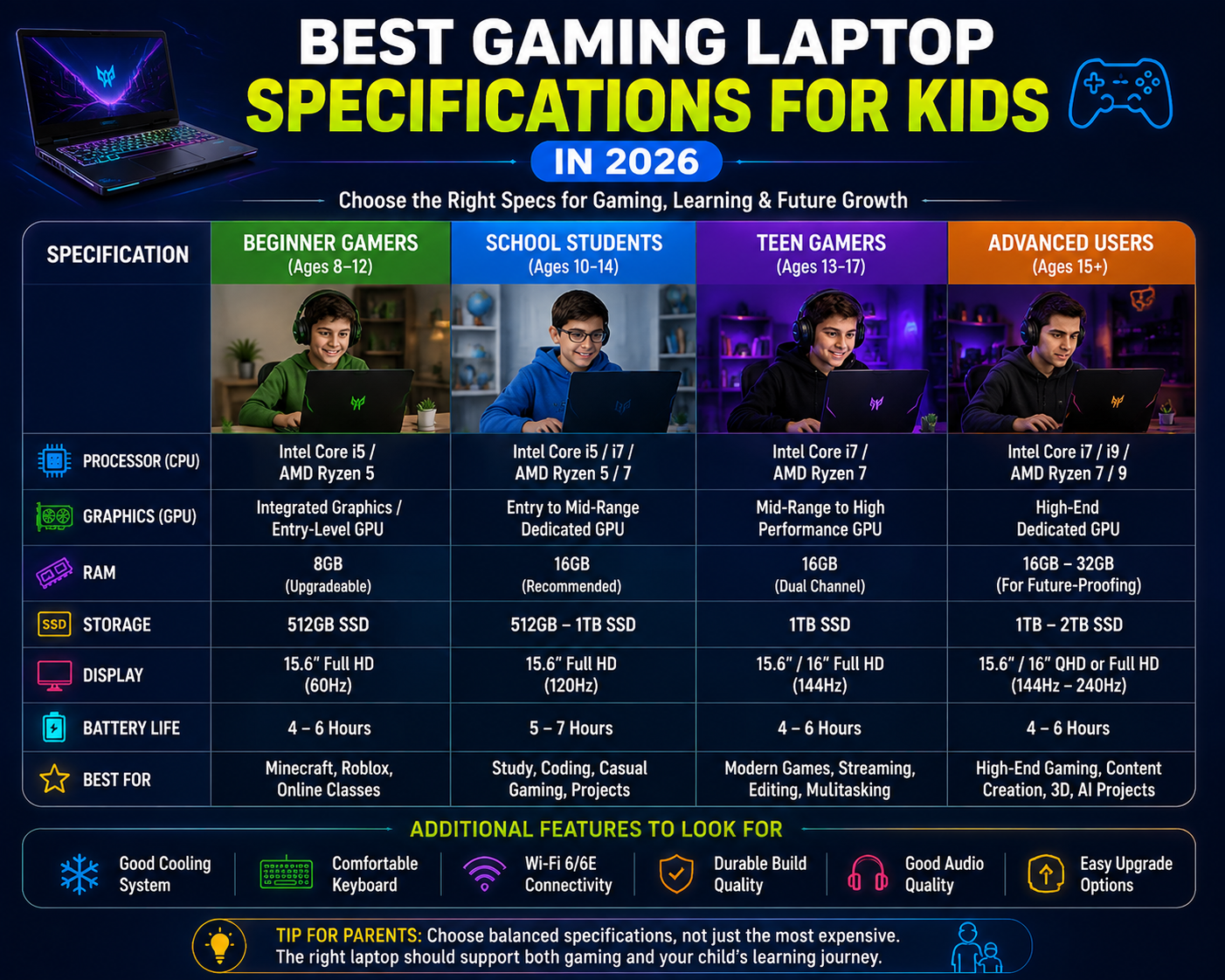
| Category | Recommended Specification | Suitable For |
|---|---|---|
| Beginner Kids | Core i5 / Ryzen 5, 8GB RAM, 512GB SSD | Online learning, Minecraft, Roblox |
| School Students | Core i5 / Ryzen 5, 16GB RAM, 512GB SSD | Gaming + Study |
| Teen Gamers | Core i7 / Ryzen 7, 16GB RAM, Dedicated GPU | Modern games |
| Advanced Users | Core Ultra / Ryzen AI, 32GB RAM, 1TB SSD | Gaming, Coding, Editing |
Key Takeaway for Parents
When choosing a Gaming Laptop for Kids, avoid focusing only on processor speed or gaming appearance. The best laptop is one that supports your child’s complete digital journey.
A balanced configuration such as:
Intel Core i5 / AMD Ryzen 5 + 16GB RAM + 512GB SSD + Dedicated Graphics
will satisfy most students and young gamers in 2026.
Budget Guide, Gaming Performance, Comparison & Safety Tips
Best Budget Range for Gaming Laptop for Kids in 2026
One of the biggest challenges for parents is deciding how much to spend on a Gaming Laptop for Kids. A higher price does not always mean a better choice. The ideal laptop should provide enough performance for current needs while offering room for future learning and upgrades.
In 2026, gaming laptops are available across different price categories, from affordable student-friendly models to premium machines designed for advanced gaming and creative work.
1. Entry-Level Budget Gaming Laptop for Kids
Approximate Budget:
₹40,000 – ₹60,000 (India)
An entry-level Budget Gaming Laptop for Kids is suitable for children who are starting their gaming journey or mainly need a laptop for school and basic entertainment.
Suitable For:
- Online classes
- Homework and assignments
- Minecraft
- Roblox
- Basic games
- Coding fundamentals
- Web browsing
Recommended Specifications:
- Processor: Intel Core i5 / AMD Ryzen 5
- RAM: 8GB (upgradeable preferred)
- Storage: 512GB SSD
- Graphics: Entry-level dedicated GPU or strong integrated graphics
- Display: Full HD display
Advantages:
✓ Affordable price
✓ Good for beginners
✓ Suitable for education and casual gaming
Limitations:
✗ Not ideal for demanding games
✗ Limited future performance for advanced users
2. Mid-Range Gaming Laptop for Kids
Approximate Budget:
₹60,000 – ₹90,000 (India)
For most families, the mid-range category offers the best balance between price and performance.
This category is ideal for a Gaming Laptop for Students who want one device for gaming, education, coding, and creativity.
Suitable For:
- Modern games
- Video editing
- Programming
- AI learning
- Digital art
- Content creation
Recommended Specifications:
- Processor: Intel Core i5/i7 or AMD Ryzen 5/7
- RAM: 16GB
- Storage: 512GB or 1TB SSD
- Graphics: Mid-range dedicated GPU
- Display: 120Hz or 144Hz Full HD display
Advantages:
✓ Long-term usability
✓ Better gaming performance
✓ Supports creative applications
✓ Good investment for teenagers
3. Premium Gaming Laptop for Kids
Approximate Budget:
₹90,000 and above
Premium gaming laptops are suitable for teenagers who are seriously interested in:
- Game development
- 3D design
- Professional editing
- Advanced gaming
- AI-based projects
Recommended Specifications:
- Processor: Intel Core i7/i9 or AMD Ryzen 7/9
- RAM: 16GB–32GB
- Storage: 1TB SSD
- Graphics: High-performance dedicated GPU
- Display: High refresh rate display
Advantages:
✓ Maximum performance
✓ Longer usable life
✓ Suitable for advanced learning
Limitations:
✗ Expensive
✗ Heavier design
✗ May provide less battery life
Best Value Recommendation for Most Parents
For most children, buying an extremely expensive laptop is unnecessary.
A balanced Affordable Gaming Laptop 2026 configuration would be:
Recommended Setup:
- Intel Core i5 / AMD Ryzen 5 processor
- 16GB RAM
- 512GB SSD
- Dedicated graphics card
- Full HD 120Hz display
This specification can handle:
- Gaming
- School work
- Coding
- Creative projects
- Future software updates
Gaming Laptop vs Normal Laptop for Kids
Parents often wonder whether they should buy a gaming laptop or a regular laptop.
The answer depends on the child’s usage requirements.
| Feature | Gaming Laptop for Kids | Normal Laptop |
|---|---|---|
| Performance | High performance hardware | Basic to moderate performance |
| Gaming | Handles modern games | Limited gaming capability |
| Graphics | Dedicated GPU available | Usually integrated graphics |
| Cooling | Advanced cooling system | Standard cooling |
| Battery Life | Usually lower | Usually better |
| Weight | Heavier | Lightweight |
| Price | Higher | More affordable |
| Future Learning | Better for coding, editing, gaming | Suitable for basic tasks |
| Upgrade Options | More upgrade-friendly | Limited options |
Which Laptop Is Better for Kids?
Choose a Normal Laptop If Your Child Mainly Uses It For:
- Online classes
- School projects
- Web browsing
- Microsoft Office
- Video calls
- Basic learning
Choose a Gaming Laptop If Your Child Uses It For:
- Minecraft
- Roblox
- Fortnite
- Coding
- Game development
- Video editing
- Animation
- Creative applications
A Laptop for Kids Gaming and Study can become a powerful learning tool when used properly.
Popular Games Kids Play and Required Laptop Performance
Gaming requirements vary depending on the game. Parents should understand that not every game needs an expensive laptop.
Minecraft
Minecraft is one of the most popular games among children.
Suitable Specifications:
- Processor: Intel Core i5 / Ryzen 5
- RAM: 8GB–16GB
- Storage: 512GB SSD
- Graphics: Integrated or entry-level dedicated GPU
For advanced Minecraft features:
- Higher RAM
- Better graphics card
- Improved cooling
Roblox
Roblox is popular because children can both play and create games.
Recommended:
- Intel Core i5 / Ryzen 5
- 8GB RAM minimum
- SSD storage
- Integrated graphics can work for basic usage
For Roblox game development:
- 16GB RAM recommended
- Better processor preferred
Fortnite
Fortnite requires better graphics performance.
Recommended:
- Intel Core i5/i7
- AMD Ryzen 5/7
- 16GB RAM
- Dedicated GPU
A mid-range gaming laptop provides a smoother experience.
Minecraft Education Edition
This version focuses on learning and creativity.
Used for:
- Coding lessons
- Science projects
- Problem-solving activities
Recommended:
- Core i5 / Ryzen 5
- 8GB RAM
- SSD storage
Esports Games
Games like:
- Valorant
- Rocket League
- Competitive multiplayer games
benefit from:
- Higher refresh rate display
- Faster processor
- Dedicated GPU
- Good cooling
Safety Tips for Parents When Giving a Gaming Laptop to Kids
A laptop is a powerful learning tool, but parents should also focus on responsible usage.
1. Manage Screen Time
Create healthy boundaries:
- Set gaming schedules
- Encourage breaks
- Avoid late-night gaming
- Balance gaming with physical activities
The goal is not to completely restrict gaming but to create healthy digital habits.
2. Use Parental Controls
Parents can use:
- Windows Family Safety features
- Screen time limits
- App restrictions
- Website filters
- Activity monitoring
These tools help children develop responsible technology habits.
3. Teach Online Safety
Children should understand:
- Never share passwords
- Avoid unknown links
- Do not communicate personal information online
- Use strong security settings
4. Install Security Software
A child-friendly laptop should have:
- Updated operating system
- Antivirus protection
- Secure browsing settings
- Regular backups
5. Encourage Educational Gaming
Not all gaming is only entertainment.
Parents can encourage:
- Minecraft Education
- Coding games
- Creative design tools
- Programming platforms
Gaming can support creativity and problem-solving skills when balanced properly.
Common Mistakes Parents Should Avoid When Buying a Gaming Laptop
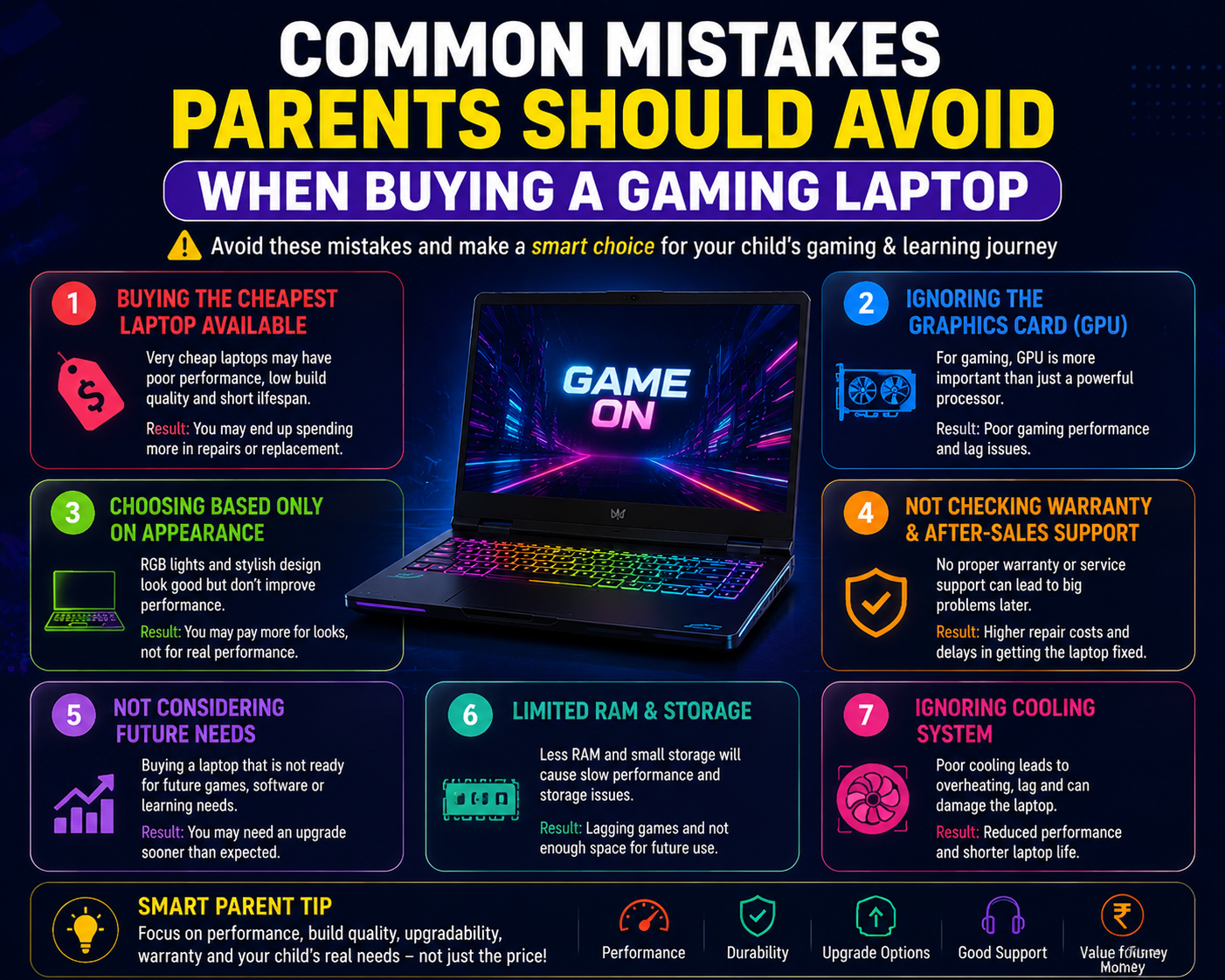
1. Buying the Cheapest Laptop Available
A very cheap laptop may become slow quickly.
Problems:
- Poor performance
- Limited upgrades
- Short lifespan
A slightly better configuration can provide years of reliable usage.
2. Ignoring the Graphics Card
Many buyers focus only on the processor.
However, for gaming:
GPU performance is extremely important.
A powerful CPU with weak graphics may not provide a good gaming experience.
3. Choosing Only Based on Appearance
Gaming laptops often have:
- RGB lighting
- Aggressive designs
- Gaming branding
These features look attractive but do not always improve performance.
Always check:
- Processor
- GPU
- RAM
- Cooling
- Build quality
4. Not Checking Warranty and Service Support
Before buying, parents should check:
- Warranty period
- Service availability
- Repair support
- Replacement policies
Good after-sales support is important because children use laptops frequently.
5. Buying Without Considering Future Needs
A laptop purchased today should ideally support future requirements.
Think about:
- Coding classes
- Higher education
- Creative projects
- New software requirements
Final Advice Before Purchase
The best Gaming Laptop for Kids is not necessarily the most expensive model.
Parents should choose a laptop that provides:
✓ Smooth gaming experience
✓ Comfortable learning environment
✓ Strong build quality
✓ Future upgrade possibilities
✓ Safe and responsible usage
For most children in 2026, a mid-range gaming laptop offers the best combination of performance, price, and long-term value.
FAQs, Conclusion & Complete SEO Package
Frequently Asked Questions (FAQ)
1. What is the best gaming laptop for kids?
The best Gaming Laptop for Kids depends on the child’s age, gaming requirements, learning needs, and budget.
For most children, a balanced laptop with:
- Intel Core i5 or AMD Ryzen 5 processor
- 16GB RAM
- 512GB SSD
- Dedicated graphics card
- Full HD display
provides excellent performance for gaming, education, coding, and creative activities.
Parents should avoid choosing only based on price or gaming appearance. A reliable laptop with balanced specifications offers better long-term value.
2. How much RAM does a gaming laptop for kids need?
For basic usage, 8GB RAM is acceptable for:
- Online classes
- Browsing
- Light gaming
- School projects
However, 16GB RAM is recommended in 2026 because modern games, creative applications, and educational software require more memory.
A laptop with 16GB RAM will provide:
- Better multitasking
- Smoother gaming
- Longer usable life
- Better support for future applications
3. Is a gaming laptop good for school students?
Yes, a gaming laptop can be an excellent choice for school students if the specifications match their needs.
A gaming laptop can support:
- Online education
- Programming classes
- Presentations
- Research work
- Video editing
- Creative projects
- Gaming
However, parents should also consider:
- Weight
- Battery life
- Portability
- Screen comfort
For students who only need basic academic tasks, a regular laptop may be sufficient.
4. Can kids use gaming laptops for coding and learning?
Yes. A modern Gaming Laptop for Kids is often suitable for coding and technology learning.
Children can use it for:
- Python programming
- Web development
- Game development
- Artificial intelligence learning
- Robotics projects
- 3D modelling
The powerful processor, RAM, and graphics capability of gaming laptops can support advanced learning activities.
5. What age is suitable for a gaming laptop?
There is no fixed age because every child has different interests and maturity levels.
Generally:
Younger Children:
A basic laptop may be enough for:
- Learning apps
- Online classes
- Educational games
Older Children and Teenagers:
A gaming laptop may be useful for:
- Advanced gaming
- Coding
- Creative projects
- Digital skills development
Parents should focus on responsible usage habits rather than age alone.
6. Is a gaming laptop better than a normal laptop for kids?
It depends on the purpose.
A gaming laptop is better for:
✓ Gaming
✓ Coding
✓ Video editing
✓ Creative applications
✓ Long-term performance
A normal laptop is better for:
✓ Basic study
✓ Browsing
✓ Office applications
✓ Lightweight usage
The right choice depends on how the child plans to use the device.
Conclusion: Choosing the Right Gaming Laptop for Kids in 2026
Technology has become an important part of children’s education, creativity, and entertainment. A well-chosen laptop can help children develop valuable digital skills while enjoying games and creative activities.
Choosing the right Gaming Laptop for Kids requires understanding more than just gaming performance. Parents should consider the complete package:
- Processor performance
- Graphics capability
- RAM capacity
- Storage speed
- Display quality
- Battery life
- Build durability
- Safety features
For most children, a mid-range laptop with a modern processor, 16GB RAM, SSD storage, and suitable graphics performance provides the best balance between gaming, learning, and future requirements.
The ideal choice is not always the most expensive laptop. The best Gaming Laptop for Kids is the one that matches your child’s interests, learning goals, and family budget while providing a safe and productive digital experience.