


Introduction:
Why Choosing the best trading laptops in 2026 can improve productivity for stock traders, investors, and cryptocurrency users.
Stock market trading in 2026 depends heavily on technology. Choosing the best trading laptops in 2026 helps traders manage charts, trading platforms, financial news, and market analysis tools smoothly.
Choosing the best trading laptop or PC is not about buying the most expensive machine. The right setup should offer smooth multitasking, reliable performance, fast storage, comfortable display options, and support for external monitors.
Choosing the best trading laptops in 2026 is important for stock traders, crypto traders, and investors who need smooth performance, fast data processing, and reliable multitasking during market hours.
The demand for powerful trading PCs and laptops in 2026 has increased because modern traders use advanced charting platforms, real-time market scanners, AI-based analysis tools, financial news applications, spreadsheets, and multiple trading accounts simultaneously. A slow computer, limited RAM, poor display quality, or unstable connectivity can affect productivity and make market analysis more difficult.
The best PCs and laptops for trading in 2026 are designed to deliver smooth multitasking, faster data processing, reliable performance, and comfortable long trading sessions. Unlike gaming computers, trading systems do not always require an expensive graphics card. Instead, traders should focus on important components such as a powerful processor, sufficient RAM, fast SSD storage, high-quality displays, multiple monitor support, and dependable internet connectivity.
Editor’s Note
This guide focuses on practical requirements for stock market traders. The best trading computer is not always the most expensive one; it should provide smooth performance, reliable connectivity, comfortable display options, and enough power for your trading workflow.
A professional trading setup may include:
- Multiple TradingView charts and technical indicators
- Stock broker applications and trading terminals
- Cryptocurrency exchange platforms
- Market news and economic calendars
- Excel spreadsheets and financial models
- Portfolio tracking tools
- Data analytics software
- Multiple monitors for real-time market observation
For beginners, a well-balanced laptop with 16GB RAM, a modern processor, and SSD storage can provide a smooth trading experience. However, professional traders who manage multiple markets may benefit from 32GB or more RAM, desktop-class processors, and multi-monitor workstation setups.
In this comprehensive guide, we will explore the best PCs and laptops for trading in 2026, including premium laptops, portable workstations, compact desktop computers, and custom-built trading PCs. We will also explain the essential specifications, features, and buying considerations to help you choose the ideal computer for your trading strategy.
Whether you are building your first trading setup or upgrading your existing workstation, selecting the right trading computer in 2026 can help you analyze markets faster, organize your workflow better, and create a more professional trading environment.
Best PCs and Laptops for Trading in 2026 – Quick Picks
| Trading Requirement | Recommended Choice | Best For |
|---|---|---|
| Best overall laptop | Apple MacBook Pro M5 | Professional traders and power users |
| Best Windows laptop | Dell XPS 14 | Windows-based traders |
| Best portable workstation | Lenovo ThinkPad P14s Gen 6 | Traders who need mobility |
| Best premium laptop | Samsung Galaxy Book 6 Ultra | Multitasking and large displays |
| Best compact PC | Apple Mac mini | Desk-based traders |
| Best high-performance PC | Custom Windows Desktop | Multi-monitor professional trading |
| Best budget option | 16GB RAM Windows laptop | Beginners and casual traders |
Table of Contents
What Makes a Good Trading Computer in 2026?
Trading does not normally require an expensive gaming GPU. Instead, traders should prioritize CPU performance, RAM, SSD storage, display quality, connectivity, reliability, and support for multiple monitors.
A modern trading setup may include:
- TradingView or another charting platform
- Stock broker software
- Cryptocurrency exchanges
- Multiple browser windows
- Financial news websites
- Excel or Google Sheets
- Economic calendars
- Discord, Telegram, WhatsApp, or other communication tools
- Screen-recording or streaming software
Therefore, the best PCs and laptops for trading in 2026 should provide enough performance to run several applications simultaneously.
Windows 11 itself has relatively modest minimum requirements—4GB RAM and 64GB storage—but these are operating-system minimums, not specifications I would recommend for a serious trading workstation.
Recommended Specifications for a Trading Laptop or PC
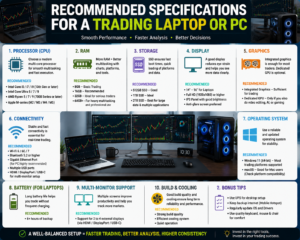
For a comfortable trading experience in 2026, consider the following specifications:
Processor
A modern Intel Core Ultra, AMD Ryzen, or Apple Silicon processor is more than capable for most trading workloads.
Recommended:
- Budget: modern Core 5/Core i5 or Ryzen 5
- Mid-range: Core Ultra 5/7 or Ryzen 7
- High-end: Core Ultra 7/9, Ryzen 9, or Apple M5 Pro/Max
A strong processor becomes particularly useful when running numerous browser tabs, charts, spreadsheets, and market applications simultaneously.
RAM
RAM is one of the most important specifications when choosing a laptop for trading.
Recommended:
- 8GB: Basic trading only
- 16GB: Recommended starting point
- 32GB: Excellent for serious multitasking
- 64GB+: Professional and advanced workloads
For most stock and crypto traders, 16GB is the practical minimum I would recommend, while 32GB provides additional headroom.
SSD Storage
Choose an SSD rather than an old mechanical hard drive.
Recommended:
- 512GB SSD: Good starting point
- 1TB SSD: Ideal for most traders
- 2TB SSD: Better for heavy users and large data collections
SSD storage improves boot times, application loading, and general system responsiveness.
Display
A good display can be more important than a powerful graphics card.
Look for:
- 14–16-inch laptop display
- Full HD or higher resolution
- Good brightness
- Comfortable viewing angles
- Anti-glare coating where possible
For a desktop setup, a 27-inch QHD monitor can be an excellent choice for charts and dashboards.
Multiple Monitor Support
Multi-monitor support is especially useful for professional traders.
One screen can display charts, another can show order execution and positions, while another can display news, economic data, or crypto market information.
For example, Lenovo’s ThinkPad P14s Gen 6 AMD can support up to four independent displays, including its internal display and three external monitors, depending on configuration.
Best Trading Laptops and PCs Comparison
Example:
| Device Type | Best For | Main Advantage |
|---|---|---|
| Business Laptop | Professional traders | Reliability |
| Premium Laptop | Travelling traders | Portability |
| Desktop PC | Full-time traders | Upgrade & multi-monitor |
| Budget Laptop | Beginners | Affordable entry |
Top Picks: Best PCs and Laptops for Trading in 2026
1. Apple MacBook Pro M5 – Best Premium Trading Laptop
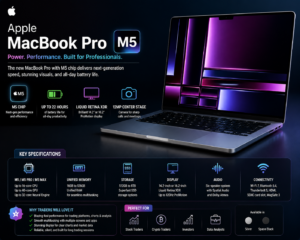
The MacBook Pro with M5-series chips is one of the strongest choices for traders who prefer macOS.
Apple offers the MacBook Pro with M5 Pro and M5 Max configurations, with memory options extending considerably beyond the needs of typical traders. The 16-inch model also offers a high-resolution Liquid Retina XDR display and ProMotion up to 120Hz.
Why it is good for trading
- Powerful Apple Silicon performance
- Excellent battery life
- High-quality display
- Strong multitasking
- Premium build quality
- Excellent for research and productivity
- Suitable for demanding professional workflows
Best for
Professional traders, investors, analysts, and users who prefer macOS.
Important consideration
Before buying a Mac for trading, check whether every trading platform, broker application, indicator, plugin, and peripheral you use is fully compatible with macOS.
2. Dell XPS 14 – Best Windows Laptop for Trading
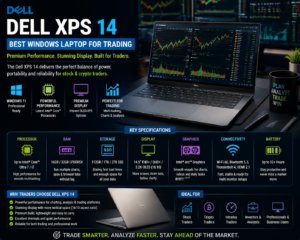
The Dell XPS 14 is an attractive choice for traders who prefer Windows and want a premium portable computer.
Current 2026 laptop testing has highlighted the XPS 14 for its combination of performance, OLED display quality, and long battery life.
Why it is good for trading
- Premium Windows experience
- High-quality display options
- Strong processor choices
- Excellent portability
- Good multitasking capability
- Suitable for business and productivity
Recommended configuration
For trading, look for:
16GB or 32GB RAM + 512GB/1TB SSD + modern Intel processor.
Best for
Stock traders, business professionals, and traders who travel frequently.
3. Lenovo ThinkPad P14s Gen 6 – Best Portable Workstation
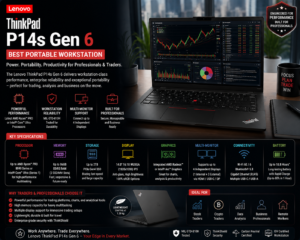
If you want a compact Windows workstation with excellent connectivity, the ThinkPad P14s Gen 6 is worth considering.
Its specifications can include up to 96GB of DDR5 memory and up to 2TB of M.2 SSD storage. Lenovo also lists support for up to four independent displays in supported configurations.
Why it is good for trading
- Excellent multitasking capability
- Large memory capacity
- Strong external-display support
- Business-focused design
- Portable workstation form factor
- Suitable for data analysis
Best for
Professional traders who combine trading with Excel, Power BI, SQL, analytics, or other demanding business applications.
4. Samsung Galaxy Book Ultra – Best Large-Screen Windows Option
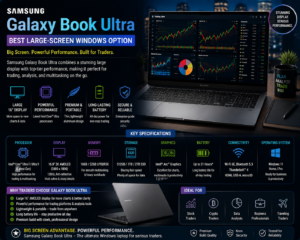
A large premium laptop can be useful for traders who want more screen space without building a desktop workstation.
The Samsung Galaxy Book 6 Ultra is among the premium Windows laptops highlighted in current 2026 testing, with a 16-inch AMOLED display and high-end processor/GPU configurations.
Why traders may like it
- Large 16-inch display
- Excellent screen quality
- Powerful hardware
- Strong multitasking
- Premium design
- Useful for trading plus content creation
Best for
Traders who want a large display and powerful Windows laptop in one device.
Best Desktop PCs for Trading in 2026
5. Apple Mac mini – Best Compact Trading PC
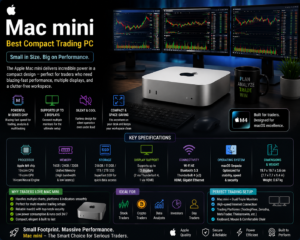
The Mac mini is an excellent option for traders who already have a monitor, keyboard, and mouse.
Its compact design makes it easy to create a clean trading desk without purchasing a large desktop tower.
Why it is good for trading
- Compact design
- Low desktop footprint
- Strong performance
- Good for everyday productivity
- Easy to pair with a large monitor
- Suitable for multi-application workflows
Best for
Home traders and investors who want a compact desktop setup.
6. Custom Windows Desktop – Best for Multi-Monitor Trading
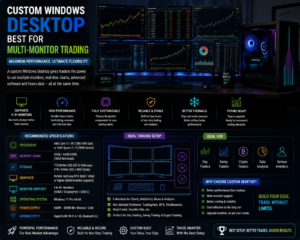
For serious traders, a custom-built Windows desktop can offer the greatest flexibility.
A desktop allows you to select the CPU, RAM, storage, graphics card, power supply, cooling system, and number of display outputs according to your requirements.
Recommended configuration
For a professional trading PC, consider:
- Modern Intel Core Ultra or AMD Ryzen 7 processor
- 32GB RAM
- 1TB NVMe SSD
- Reliable motherboard
- Multiple monitor outputs
- Quality power supply
- Quiet cooling system
- Windows 11
A dedicated high-end graphics card is not essential for normal trading. However, it becomes useful if you also use the PC for gaming, video editing, 3D applications, AI workloads, or other GPU-intensive tasks.
Best for
Professional stock traders, crypto traders, quantitative analysts, and multi-monitor users.
Best Budget PC or Laptop for Trading
You don’t necessarily need to spend a huge amount of money to start trading.
A good budget trading laptop should have:
- Modern Core 5/Core i5 or Ryzen 5 processor
- 16GB RAM
- 512GB SSD
- Full HD display
- Wi-Fi 6 or newer
- HDMI or USB-C display connectivity
- Reliable keyboard and touchpad
For beginners, this specification provides a much better balance than purchasing an inexpensive laptop with only 4GB or 8GB RAM.
Best Laptop for Stock Trading
For stock trading, prioritize:
- CPU performance
- 16GB+ RAM
- SSD storage
- External monitor support
- Comfortable display
- Reliable Wi-Fi
- Battery life
- Keyboard quality
A stock trader often has several charts, browser tabs, spreadsheets, and trading applications open at the same time. Therefore, multitasking performance is more important than gaming-level graphics.
Best Laptop for Crypto Trading
Crypto traders may have even more applications open simultaneously.
A typical crypto trading workstation can include:
- TradingView
- Multiple exchange tabs
- Crypto news
- Market scanners
- Portfolio trackers
- Discord or Telegram
- Blockchain explorers
- Spreadsheet tools
For this reason, 32GB RAM can be an excellent choice for serious crypto traders, especially when using multiple displays and applications.
How Many Monitors Do You Need for Trading?
There is no universal number.
One Monitor
Suitable for:
- Beginners
- Long-term investors
- Occasional traders
Two Monitors
A great setup for most active traders.
Monitor 1: Charts and technical analysis
Monitor 2: Orders, positions, news, or watchlist
Three or Four Monitors
Useful for:
- Intraday traders
- Professional traders
- Crypto traders
- Market analysts
- Traders monitoring several markets simultaneously
The key is not simply having more monitors. The goal is to organize information so that important data remains visible without excessive window switching.
Do Traders Need a Dedicated Graphics Card?
Usually, no.
Stock charts, browser-based platforms, spreadsheets, and most trading applications generally do not require a powerful gaming GPU.
An integrated GPU is sufficient for many traders.
A dedicated GPU becomes more useful if you also:
- Play demanding games
- Edit 4K video
- Run AI workloads
- Use 3D applications
- Stream content
- Perform GPU-based data processing
Therefore, instead of spending heavily on a graphics card, many traders would benefit more from investing in 32GB RAM, a faster SSD, better monitors, and reliable connectivity.
Windows vs Mac for Trading
Windows
Windows is generally the safer choice if your trading workflow depends on a wide range of third-party applications, utilities, broker tools, or specialized Windows software.
Advantages
- Broad software compatibility
- Large range of hardware
- Many laptop choices
- Easy multi-monitor configurations
- Upgradeable desktop options
macOS
MacBooks can provide excellent performance, battery life, displays, and build quality.
Advantages
- Excellent battery life
- Powerful Apple Silicon chips
- Premium displays
- Quiet operation
- Strong productivity experience
However, traders should verify compatibility with their preferred broker and trading software before purchasing.
Important Features Traders Should Not Ignore
1. Internet Connectivity
A powerful computer cannot compensate for an unreliable internet connection.
Consider:
- Wi-Fi 6/6E/7 where supported
- Gigabit Ethernet for desktop setups
- Reliable broadband
- Mobile hotspot backup
2. UPS for Desktop Traders
A UPS can help protect a desktop trading setup from sudden power interruptions.
This is particularly valuable if your trading computer, monitor, router, and modem all depend on mains electricity.
3. Backup Internet
A secondary internet connection can be useful for active traders.
For example:
Primary broadband + mobile hotspot backup
This can reduce dependence on a single connection during important market sessions.
4. Ergonomic Display Setup
A comfortable trading setup matters when you spend several hours looking at charts.
Consider:
- Adjustable monitor stand
- Comfortable viewing distance
- Good desk height
- External keyboard and mouse
- Reduced screen glare
- Proper lighting
PC or Laptop: Which Is Better for Trading?
| Feature | Laptop | Desktop PC |
| Portability | Excellent | Poor |
| Upgradeability | Limited | Excellent |
| Multi-monitor setup | Good | Excellent |
| Performance per price | Good | Excellent |
| Battery backup | Built-in | Requires UPS |
| Desk space | Low | Higher |
| Travel | Excellent | Poor |
| Long-term upgrades | Limited | Excellent |
Choose a laptop if:
You travel frequently, work from different locations, or want an all-in-one trading computer.
Choose a desktop if:
You trade primarily from home and want multiple monitors, maximum performance, and future upgrades.
Recommended Trading PC Specifications by Budget
| Budget Level | Recommended Configuration |
| Entry Level | Core 5/Ryzen 5 + 16GB RAM + 512GB SSD |
| Mid Range | Core Ultra 5/7 or Ryzen 7 + 16/32GB RAM + 1TB SSD |
| Professional | Core Ultra 7/9 or Ryzen 9 + 32/64GB RAM + 1–2TB SSD |
| High-End | Ryzen 9/Core Ultra 9 + 64GB+ RAM + 2TB SSD + multi-monitor support |
These are practical recommendations rather than strict requirements. Your actual needs depend on the number of applications, charts, monitors, datasets, and other workloads you use.
What Should You Avoid When Buying a Trading Computer?
Avoid buying a computer based only on processor branding or appearance.
Be cautious about:
- 4GB RAM systems
- Very small storage drives
- Slow mechanical hard drives
- Poor-quality displays
- Limited monitor connectivity
- Weak Wi-Fi hardware
- Non-upgradable memory when you expect heavy multitasking
- Gaming GPUs that you don’t actually need
Instead, prioritize the components that directly improve your trading workflow.
Final Verdict: Best PCs and Laptops for Trading in 2026
The best PCs and laptops for trading in 2026 are not necessarily the most expensive computers. A balanced system with a modern processor, 16GB or 32GB RAM, fast SSD storage, good display quality, reliable connectivity, and multi-monitor support is more important for most traders.
For premium laptop users, the Apple MacBook Pro M5 is a powerful option, while the Dell XPS 14 is an excellent Windows alternative. Traders who need workstation-class expandability and extensive external-display support can consider the Lenovo ThinkPad P14s Gen 6. For desk-based traders, a custom Windows desktop or compact Mac mini setup can provide excellent value and flexibility.
Ultimately, the right trading PC or laptop should match your trading style. Beginners can start with a good 16GB laptop, active traders may prefer 32GB and two or more monitors, while professional users can build a powerful multi-monitor workstation.
Selecting the best trading laptops in 2026 depends on your trading style, number of applications used, and budget.
Frequently Asked Questions
1. What are the best trading laptops in 2026?
Answer:
The best trading laptops in 2026 are devices that offer powerful processors, sufficient RAM, SSD storage, and reliable performance for running trading platforms.
2. How much RAM is needed for stock trading?
Answer:
16GB RAM is recommended for most traders, while professional users running multiple charts and applications may prefer 32GB RAM.
3. Is a laptop or desktop better for trading?
Answer:
Desktop PCs provide better upgrade options and multi-monitor support, while laptops offer portability.
4. Do traders need a dedicated graphics card?
Answer:
Most traders do not need a high-end graphics card unless they use advanced visualization, AI tools, or other demanding applications.
5. What is the best budget laptop for trading?
Answer:
A laptop with a modern processor, 16GB RAM, SSD storage, and a quality display can handle most beginner trading needs.
Is a laptop or desktop better for trading?
Desktop PCs provide better upgrade options and multiple monitor support, while laptops offer portability for traders who work from different locations.
Two monitors are a practical choice for many active traders. Three or four monitors can be useful for traders who monitor several markets, charts, news sources, and trading applications simultaneously.
What are the best trading laptops in 2026?
The best trading laptops in 2026 are models that provide fast processors, enough RAM, SSD storage, reliable displays, and smooth multitasking for trading platforms.
Final Thoughts: Build the Right Trading Setup for Your Strategy
Choosing the best PCs and laptops for trading in 2026 is not simply about buying the most powerful or expensive computer. The right trading system should provide fast performance, smooth multitasking, reliable connectivity, a comfortable display, and enough memory to handle your everyday trading workflow.
For most stock and crypto traders, a computer with a modern processor, 16GB or 32GB RAM, a fast SSD, and support for multiple monitors offers an excellent balance of performance and value. If you trade primarily from home, a desktop PC can provide better upgrade options and multi-monitor flexibility. If you travel frequently, a powerful laptop gives you the freedom to trade from almost anywhere.
Before making your purchase, consider your trading style, number of charts, trading platforms, monitor requirements, budget, and future needs. Investing in a reliable computer and a well-organized trading setup can make your workflow more efficient and comfortable.
Whether you are a beginner entering the stock market, an experienced intraday trader, or an active crypto trader, choosing the right trading PC or laptop is an important part of building a dependable trading workstation.
Choose the computer that fits your trading strategy—not simply the one with the highest specifications.
One thought on “Best PCs and Laptops for Trading in 2026: Top Picks for Stock and Crypto Traders”