


Artificial intelligence is rapidly changing the way people work, create content, develop software, and manage daily tasks. While traditional AI chatbots mainly focus on answering questions, the next generation of AI platforms is moving toward intelligent AI agents that can understand workflows, use tools, and complete tasks with less human involvement.
Among these emerging platforms, OpenClaw 2.0 has gained attention as a major step forward in AI assistant technology. The latest update transforms OpenClaw from a simple AI assistant framework into a more powerful AI agent platform with improved automation, security, collaboration features, and advanced workflow management.
The official release identifies OpenClaw 2.0 as version 2026.8.1, bringing major improvements such as conversation search, distributed sessions across devices and cloud workers, interactive dashboards, private credential handling, automation permissions, and richer audio and video support.
For developers, businesses, creators, and technology enthusiasts, this update represents the growing shift from basic AI conversations toward autonomous AI-powered productivity systems.
| Feature | OpenClaw 2.0 | Traditional AI Chatbots |
|---|---|---|
| AI Agents | Yes | Limited |
| Automation | Advanced | Basic |
| Workflow | Yes | Limited |
| Multi-device support | Yes | Depends |
What is OpenClaw 2.0?
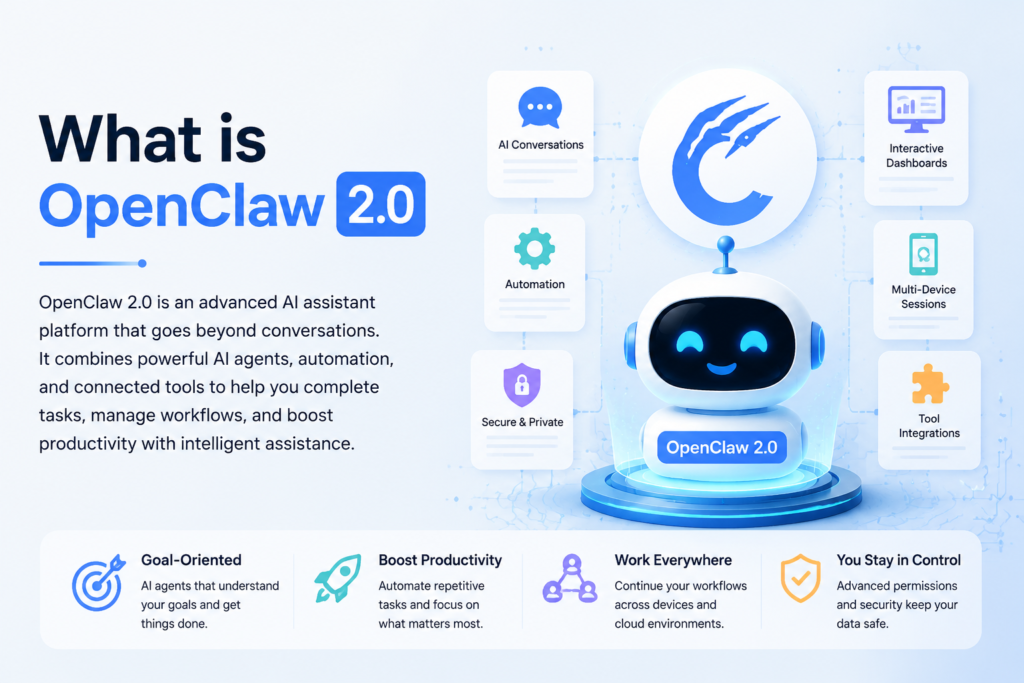
OpenClaw 2.0 is an advanced AI assistant and agent platform designed to help users connect artificial intelligence with tools, applications, devices, and automated workflows.
Unlike regular AI chat applications that only generate text responses, OpenClaw focuses on creating AI agents capable of performing practical tasks based on user instructions and permissions.
The platform can be used for:
- AI-powered automation
- Personal productivity improvement
- Developer workflows
- Business process management
- Smart digital assistance
- Multi-device AI operations
The latest version introduces a more mature AI agent ecosystem where users can manage conversations, automate tasks, control permissions, and interact with AI workflows more efficiently.
Why OpenClaw 2.0 Matters in the AI Revolution
The AI industry in 2026 is moving toward a new generation of intelligent assistants. Instead of only responding to questions, AI systems are becoming capable of planning actions, using connected tools, and completing multi-step processes.
For example:
Traditional AI Chatbot:
User asks a question → AI provides an answer
AI Agent Platform:
User gives a goal → AI understands the task → AI uses tools → AI completes actions
This difference makes OpenClaw 2.0 an important development in the AI assistant market.
The update focuses on solving some of the biggest challenges in AI adoption:
- Managing complex workflows
- Protecting user data
- Improving automation control
- Supporting multiple devices
- Making AI easier to use
OpenClaw 2.0 Key Features and Updates
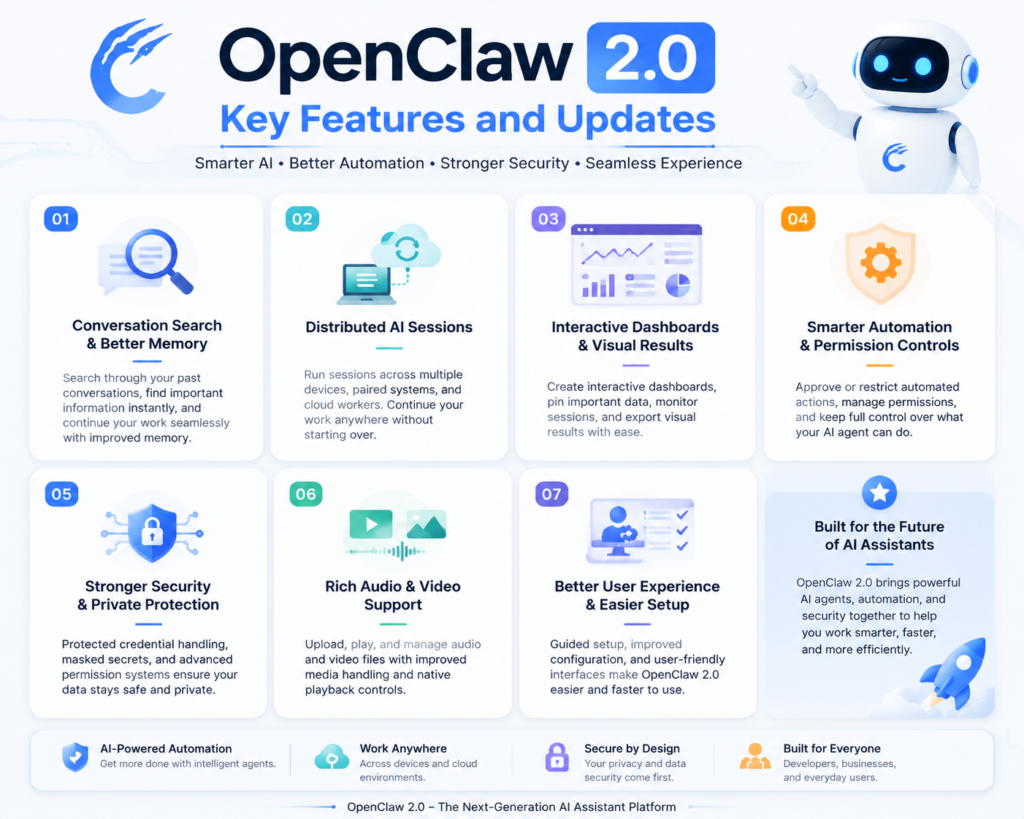
1. Advanced Conversation Search and Better AI Memory
One of the most useful improvements in OpenClaw 2.0 is the ability to search previous conversations.
Earlier AI workflows often became difficult to manage when users had hundreds of conversations. Finding old information required manually scrolling through chat history.
The new conversation search feature allows users to:
- Search previous discussions
- Find specific words or phrases
- Reopen important conversations
- Continue previous projects easily
This improvement is especially useful for professionals who use AI daily for research, coding, writing, or business planning.
For example, a content creator can quickly find previous article research, while a developer can return to an earlier coding discussion without rebuilding the entire context.
2. Distributed AI Sessions Across Devices and Cloud Workers
One of the biggest changes introduced in OpenClaw 2.0 is support for distributed sessions.
Previously, AI workflows were often connected to one main environment. The new update allows users to run sessions across:
- Paired devices
- Cloud workers
- Multiple environments
Users can move their AI workspace and continue tasks without starting from the beginning.
For example:
A developer may begin building an application on a desktop computer and later continue the same AI-assisted workflow through another connected system.
This creates a more flexible AI experience similar to modern cloud-based productivity platforms.
3. Interactive Dashboards and Visual AI Results
AI responses are becoming more than simple text messages.
OpenClaw 2.0 introduces interactive dashboards and widgets that help users understand AI-generated information in a more visual way.
The platform allows users to:
- Create interactive views
- Pin useful information
- Monitor ongoing sessions
- Export rendered results
This improvement can help businesses and professionals who need structured information instead of long text responses.
Possible applications include:
- Business dashboards
- Project monitoring
- Data analysis
- Workflow tracking
4. Smarter AI Automation With Permission Controls
Automation is one of the biggest advantages of AI agents, but uncontrolled automation can create security risks.
To solve this problem, OpenClaw 2.0 introduces improved permission systems.
Users can:
- Approve specific automated actions
- Control AI access
- Review permissions
- Remove unwanted authorizations
This approach gives users more confidence because AI agents can perform tasks while remaining under human supervision.
The platform follows an important AI principle:
Powerful automation with controlled access.
5. Stronger Security and Private Credential Protection
Security has become a major concern as AI agents gain access to more tools and personal information.
OpenClaw 2.0 improves privacy through protected credential handling.
The update includes:
- Masked credential requests
- Protected secret management
- Controlled access permissions
- Safer automation workflows
Instead of exposing sensitive information directly inside AI conversations, credentials can be handled through protected systems.
This makes the platform more suitable for professional and business environments.
6. Improved Audio and Video Support
Modern AI experiences are expanding beyond text.
The latest OpenClaw 2.0 update improves multimedia capabilities with:
- Better media attachment handling
- Audio improvements
- Video upload support
- Native playback controls
These improvements create opportunities for:
- Content creators
- Educators
- Marketing professionals
- Multimedia teams
AI assistants are becoming capable of understanding and working with different types of information, including text, images, audio, and video.
7. Better User Experience and Easier Setup
One challenge with advanced AI platforms is complexity.
OpenClaw 2.0 improves the onboarding experience by introducing:
- Guided setup options
- Better configuration support
- Improved model setup assistance
- More user-friendly controls
This helps reduce the technical barrier for new users who want to explore AI agents without spending too much time on complicated settings.
Latest OpenClaw 2.0 Advanced Updates in 2026
The latest OpenClaw 2.0 update introduces several improvements that focus on making AI agents more intelligent, secure, and practical for real-world usage. The platform is moving beyond basic AI conversations and becoming a complete AI workflow environment where users can manage tasks, connect tools, and automate activities.
The 2026.8.1 release focuses on improving reliability, user control, collaboration, and AI agent capabilities. These improvements make OpenClaw 2.0 more suitable for developers, businesses, and advanced AI users.
Smarter AI Agents With Improved Context Management
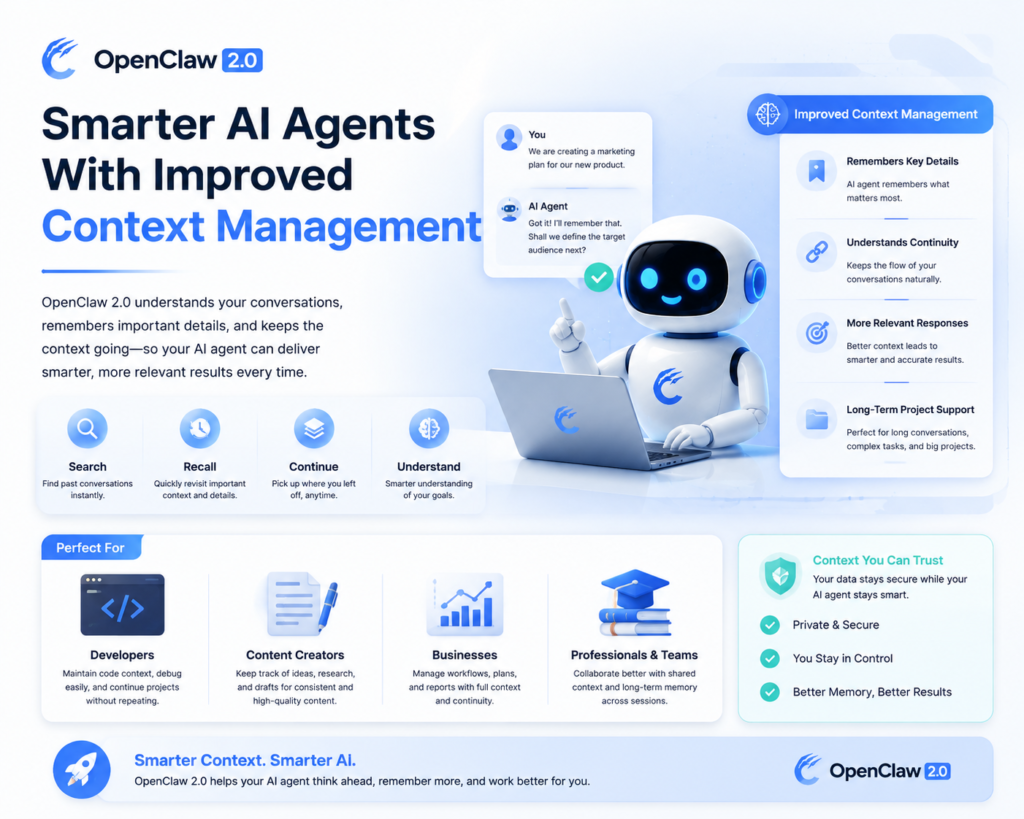
One of the biggest challenges with AI assistants is maintaining context during long-term projects.
The latest OpenClaw 2.0 improvements focus on better context handling, allowing AI agents to understand previous interactions more effectively.
Users can benefit from:
- Improved conversation continuity
- Faster access to previous information
- Better workflow organization
- More meaningful AI responses
For professionals working on large projects, this reduces the need to repeatedly explain background information to the AI assistant.
For example:
A software developer working on a long-term application can continue development discussions without losing previous technical details.
Similarly, content creators can maintain consistent research and writing workflows.
OpenClaw 2.0 Multi-Device AI Workflow Experience
Modern users work across multiple devices, including laptops, desktops, tablets, and cloud environments.
OpenClaw 2.0 improves flexibility by supporting distributed AI sessions.
This allows users to:
- Continue AI tasks across different environments
- Connect multiple devices
- Use cloud-based processing
- Maintain workflow continuity
This feature represents an important shift toward portable AI assistants.
Instead of being tied to a single computer, AI workflows can become available wherever users need them.
For businesses, this creates opportunities for teams to collaborate on AI-powered projects more efficiently.
Advanced Security Features for Enterprise AI Usage
As AI agents become more powerful, security becomes one of the most important considerations.
A normal chatbot only provides information, but an AI agent may interact with:
- Files
- Applications
- External services
- Business systems
Because of this, OpenClaw 2.0 focuses heavily on security improvements.
Important security enhancements include:
Controlled Permissions
Users can decide what actions AI agents can perform.
Protected Credentials
Sensitive information can remain hidden and protected.
Safer Automation
Automated tasks can operate with predefined permissions.
These improvements make AI automation safer for professional environments.
Improved Team Collaboration Features
AI is no longer only a personal productivity tool. Businesses are increasingly using AI systems across teams.
The latest OpenClaw 2.0 improvements support better collaboration through:
- Shared AI sessions
- Role-based access
- Organized workflows
- Better project management
Teams can use AI assistants while maintaining control over who can access specific information.
This can help organizations improve:
- Internal communication
- Research workflows
- Customer support operations
- Business productivity
OpenClaw 2.0 Performance Analysis
Performance plays an important role in the success of any AI platform.
The improvements introduced in OpenClaw 2.0 focus on making AI workflows faster, smoother, and easier to manage.
Faster Information Retrieval
The conversation search system helps users quickly find previous information.
Benefits include:
- Less time searching old conversations
- Faster project continuation
- Better knowledge management
For users who depend on AI every day, this improvement can significantly increase productivity.
Improved Workflow Efficiency
AI agents are designed to reduce repetitive work.
With OpenClaw 2.0, users can improve efficiency through:
- Automated processes
- Better task management
- Connected tools
- Reusable workflows
Instead of manually completing every step, users can allow AI agents to handle specific approved tasks.
Better Resource Management
The latest update improves flexibility by supporting different AI environments.
Users can choose suitable options depending on their requirements:
- Local computing resources
- Cloud processing
- Connected devices
This allows better control over performance and operational costs.
Real-World Uses of OpenClaw 2.0
The practical applications of OpenClaw 2.0 are expanding across different industries.
Software Development
Developers can use AI agents for:
- Code assistance
- Debugging support
- Project documentation
- Automation workflows
Business Operations
Companies can explore AI automation for:
- Data processing
- Customer support
- Internal reports
- Workflow management
Content Creation
Content professionals can use AI assistance for:
- Topic research
- Article planning
- Content organization
- Creative workflows
Personal Productivity
Individual users can benefit from:
- Task management
- Research assistance
- Information organization
- Daily automation
OpenClaw 2.0 vs Previous Version
| Feature | OpenClaw 2.0 | Previous Version |
|---|---|---|
| AI Agent Capability | Advanced AI workflows with improved automation | Basic AI assistance |
| Conversation Management | Search and improved context handling | Limited conversation management |
| Device Support | Distributed sessions across devices and environments | More limited workflow flexibility |
| Dashboards | Interactive widgets and visual interfaces | Fewer visualization options |
| Automation | Permission-based task automation | Basic automation support |
| Security | Improved credential protection and access control | Limited security features |
| Multimedia Support | Better audio and video handling | Basic media capabilities |
| User Experience | Improved onboarding and easier management | More technical setup |
How OpenClaw 2.0 Can Benefit Different Users
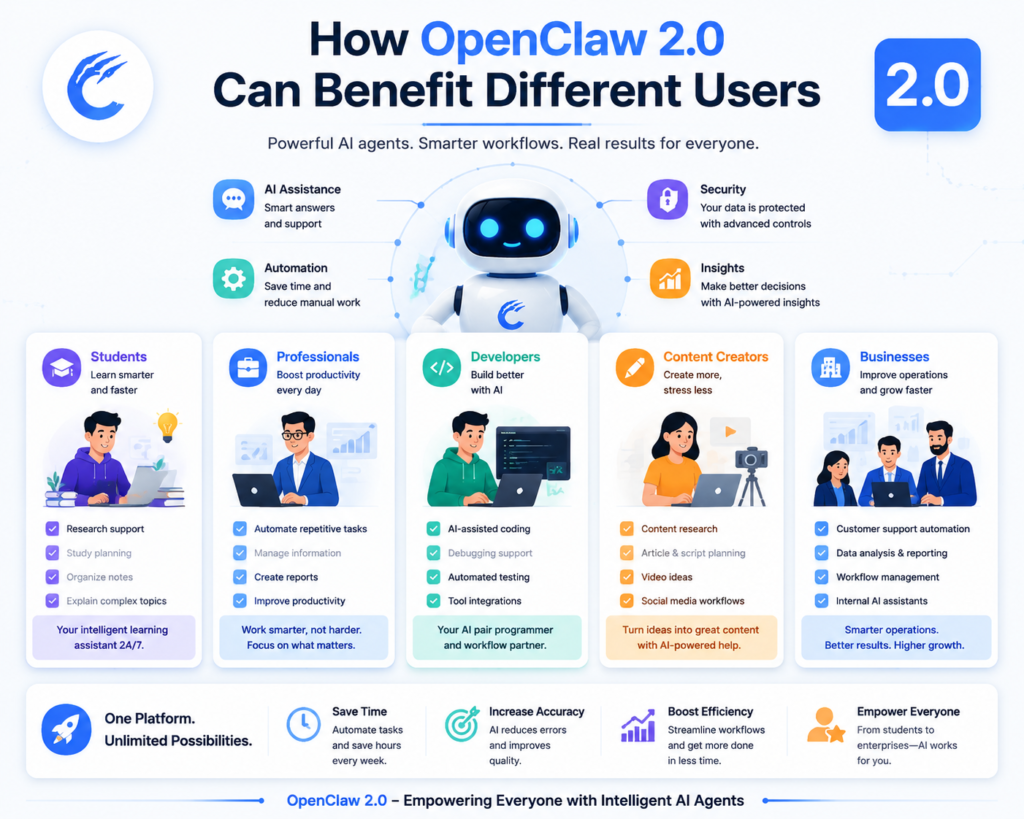
Benefits for Students
Students can use OpenClaw 2.0 as an intelligent learning assistant.
Possible uses include:
- Research support
- Study planning
- Organizing notes
- Explaining complex topics
AI-powered learning tools can help students save time and improve productivity.
Benefits for Professionals
Professionals can use OpenClaw 2.0 to improve daily workflows.
Advantages include:
- Automating repetitive activities
- Managing information
- Creating reports
- Improving productivity
For employees handling large amounts of information, AI agents can become valuable digital assistants.
Benefits for Developers
Developers are among the biggest beneficiaries of AI agent platforms.
With OpenClaw 2.0, developers can explore:
- AI-assisted coding
- Automated testing workflows
- Development documentation
- Tool integrations
The platform provides opportunities to build customized AI-powered solutions.
Benefits for Content Creators
Content creators can use AI automation to improve their creative process.
Applications include:
- Content research
- Article planning
- Video ideas
- Social media workflow management
By reducing repetitive tasks, creators can focus more on creativity and strategy.
Benefits for Businesses
Businesses can use OpenClaw 2.0 to improve operational efficiency.
Potential applications include:
- Customer service automation
- Employee productivity tools
- Data analysis workflows
- Internal AI assistants
Companies adopting AI agents early may gain advantages in speed and efficiency.
OpenClaw 2.0 Limitations and Challenges
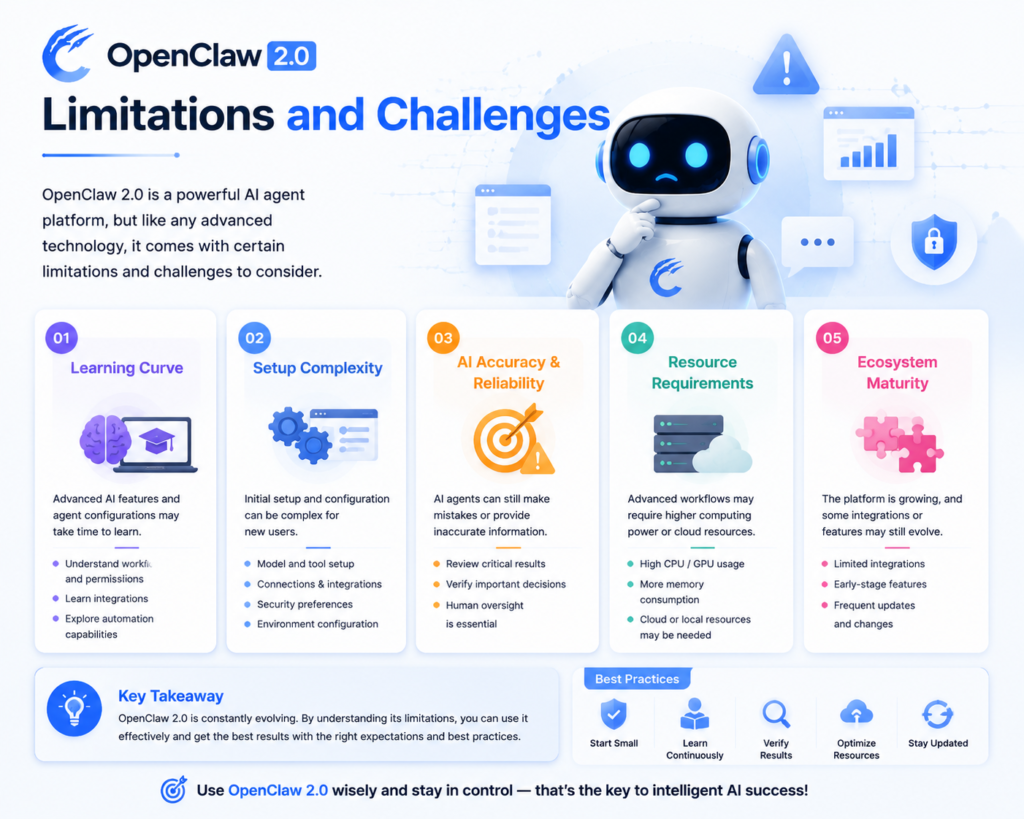
Although OpenClaw 2.0 introduces impressive improvements, users should also consider some limitations.
1. Learning Curve
Advanced AI platforms require some understanding.
New users may need time to learn:
- AI agent configuration
- Permissions
- Integrations
- Automation settings
Compared with simple AI chat applications, OpenClaw 2.0 may require more technical knowledge.
2. Setup Complexity
Powerful features often require additional configuration.
Users may need to manage:
- Models
- Tools
- Connections
- Security preferences
Beginners may initially find the setup process challenging.
3. AI Accuracy and Reliability
Although AI technology has improved significantly, AI agents can still make mistakes.
Users should review important tasks related to:
- Business decisions
- Financial information
- Security operations
- Professional communication
Human supervision remains important.
4. Resource Requirements
Advanced AI workflows may require suitable hardware or cloud resources.
Performance can depend on:
- Available computing power
- Connected services
- AI models being used
Users should select configurations according to their requirements.
Is OpenClaw 2.0 Ready for Mainstream Adoption?
OpenClaw 2.0 shows strong potential, but widespread adoption will depend on factors such as:
- Ease of use
- Security improvements
- Integration support
- Community growth
- Real-world reliability
As AI agents become more common, platforms like OpenClaw could become important tools for personal and professional productivity.
OpenClaw 2.0 Future Potential: The Next Phase of AI Agent Technology
The future of artificial intelligence is moving beyond simple question-answer systems. The next generation of AI is expected to include intelligent agents that can understand goals, make decisions, use connected tools, and complete tasks with minimal human involvement.
In this changing AI landscape, OpenClaw 2.0 represents an important step toward autonomous AI assistants. By combining automation, security controls, multi-device workflows, and intelligent task management, the platform reflects the direction where AI technology is heading in 2026 and beyond.
The Rise of Autonomous AI Assistants
Traditional AI tools require users to provide instructions for every action. However, AI agents are designed to understand objectives and complete multiple steps automatically.
For example:
A traditional AI tool:
“Write a report about smartphone market trends.”
An AI agent:
Researches information → Organizes data → Creates a report → Suggests improvements.
This evolution creates opportunities for platforms like OpenClaw 2.0 to become personal and professional digital assistants.
Future AI agents may help users with:
- Managing daily tasks
- Automating business operations
- Analyzing large amounts of information
- Creating content
- Managing software workflows
OpenClaw 2.0 and AI Technology Trends in 2026
Several major AI trends are shaping the technology industry.
1. AI Agents Everywhere
Companies are moving from simple chatbots toward AI-powered assistants that can perform tasks.
Examples include:
- Personal AI assistants
- Business automation agents
- Coding assistants
- Research agents
OpenClaw 2.0 fits into this growing AI agent ecosystem by focusing on practical automation.
2. More Personal and Context-Aware AI
Future AI systems will become more personalized.
Instead of starting every conversation from zero, AI assistants will understand:
- User preferences
- Previous projects
- Working patterns
- Frequently used tools
The improved context management in OpenClaw 2.0 supports this direction.
3. Secure AI Automation
Security will become one of the biggest factors in AI adoption.
Businesses will require AI systems that can:
- Protect sensitive information
- Control permissions
- Maintain privacy
- Provide transparent actions
The security improvements in OpenClaw 2.0 demonstrate the importance of responsible AI automation.
Potential Impact of OpenClaw 2.0 on Businesses
Businesses are expected to become some of the biggest users of AI agent technology.
Possible business applications include:
Customer Support
AI agents can help companies:
- Answer customer questions
- Manage requests
- Provide faster responses
Data Analysis
Businesses can use AI assistants to:
- Analyze reports
- Identify trends
- Generate insights
Internal Productivity
Companies can automate:
- Documentation
- Scheduling
- Research tasks
- Workflow management
OpenClaw 2.0 vs Traditional AI Tools
| Category | Traditional AI Tools | OpenClaw 2.0 Approach |
|---|---|---|
| Main Purpose | Answer questions | Complete workflows |
| Interaction | User-driven | Goal-driven |
| Automation | Limited | Advanced task automation |
| Memory | Basic context | Improved workflow continuity |
| Tool Usage | Limited integrations | Connected AI workflows |
| Security Control | Basic | Permission-based access |
| Target Users | General users | Developers, professionals, businesses |
Why Developers Should Watch OpenClaw 2.0
Developers are likely to play an important role in the growth of AI agent platforms.
With OpenClaw 2.0, developers can explore:
- Custom AI workflows
- Automated programming assistance
- Tool integrations
- AI-powered applications
The platform could become valuable for developers who want to build smarter software experiences.
OpenClaw 2.0: Should You Use It?
Whether OpenClaw 2.0 is useful depends on your requirements.
It may be useful for you if:
✅ You want advanced AI automation
✅ You manage complex workflows
✅ You work with development or technology projects
✅ You want more control over AI assistants
✅ You are interested in AI agent technology
It may not be ideal if:
❌ You only need simple AI conversations
❌ You prefer zero-configuration tools
❌ You do not need automation features
For users who want a powerful AI workflow platform, OpenClaw 2.0 provides an interesting option.
Frequently Asked Questions (FAQ)
What is OpenClaw 2.0?
OpenClaw 2.0 is an advanced AI assistant platform designed around AI agents, automation, connected tools, and intelligent workflows. The latest version introduces improvements in security, session management, dashboards, and productivity features.
What are the main features of OpenClaw 2.0?
The major features include:
- Conversation search
- Distributed AI sessions
- Interactive dashboards
- Automation permissions
- Better security controls
- Improved multimedia support
- Enhanced workflow management
Is OpenClaw 2.0 a chatbot?
No. While it can provide conversational AI features, OpenClaw 2.0 focuses more on AI agents that can perform tasks, manage workflows, and interact with connected tools.
Is OpenClaw 2.0 free to use?
Availability, pricing, and licensing depend on the specific OpenClaw deployment and official updates. Users should check the official OpenClaw documentation for the latest information.
Who should use OpenClaw 2.0?
OpenClaw 2.0 can be useful for:
- Developers
- Businesses
- Content creators
- Technology enthusiasts
- Professionals looking for AI automation
How is OpenClaw 2.0 different from previous versions?
The latest version improves AI workflow management through better search, distributed sessions, security features, dashboards, and automation controls.
Is OpenClaw 2.0 the future of AI assistants?
OpenClaw 2.0 represents the direction of modern AI assistants, where artificial intelligence moves from answering questions toward completing useful tasks independently.
Final Thoughts: OpenClaw 2.0 Shows the Future of AI Productivity
Artificial intelligence is entering a new era where AI systems are becoming more than digital chat assistants. They are evolving into intelligent agents capable of managing workflows, automating tasks, and helping users achieve goals faster.
OpenClaw 2.0 demonstrates this transition with its improved AI capabilities, stronger security features, distributed sessions, interactive dashboards, and automation-focused approach.
While the platform may require some technical understanding, its potential benefits for developers, businesses, and advanced users are significant.
As AI technology trends continue to evolve in 2026, platforms like OpenClaw 2.0 could play an important role in shaping how people interact with intelligent digital assistants.
For more updates about AI tools, smartphones, gadgets, and emerging technology trends, stay connected with Jerry Boss Tech Boss.
Sources & References
- OpenClaw Official Release Notes – v2026.8.1 (AKA OpenClaw 2.0)
- OpenClaw Release Information and Changelog Details

2 thoughts on “OpenClaw 2.0: The Next-Generation AI Assistant Platform Gets a Massive Upgrade in 2026”