


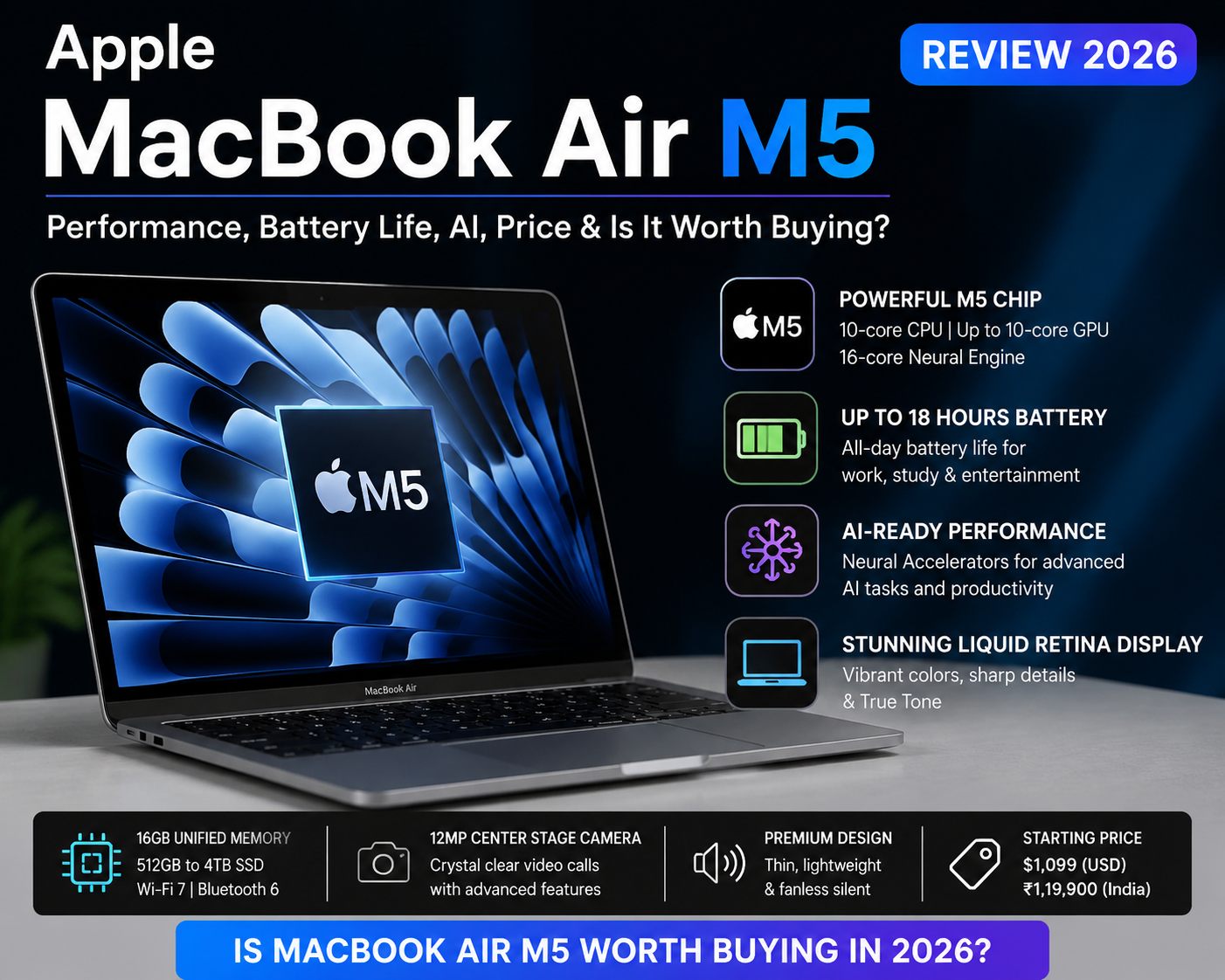
Apple MacBook Air M5 Review 2026: Quick Verdict
The Apple MacBook Air M5 is one of the most attractive premium laptops of 2026 for students, professionals, business users, content creators and people who want a powerful yet highly portable laptop.
Apple has upgraded the MacBook Air with the M5 chip, faster AI capabilities, 512GB starting storage, Wi-Fi 7, Bluetooth 6, a 12MP Center Stage camera and support for up to two external displays. The laptop continues to offer a thin, lightweight and completely fanless design.
The 13-inch MacBook Air M5 starts at ₹1,19,900 in India, while the 15-inch model starts at ₹1,44,900, according to Apple’s launch pricing. However, Apple’s current online store pricing should always be checked before purchasing because prices, offers and configurations can change.
Our Verdict
Rating: 4.7/5
The MacBook Air M5 is an excellent choice if you want:
- Excellent everyday performance
- Long battery life
- Powerful on-device AI capabilities
- Premium build quality
- Silent fanless operation
- Excellent portability
- A high-quality display
- Strong integration with the iPhone and Apple ecosystem
- Long-term usability
However, it is not the perfect laptop for everyone. Gamers, users who need many ports, people who require Windows-only software and buyers looking for maximum performance for sustained professional workloads may want to consider alternatives.
Table of Contents
What Is New in the MacBook Air M5?
The MacBook Air M5 launched in 2026 with several meaningful improvements over earlier-generation MacBook Air models.
The major upgrades include:
- Apple M5 chip
- 10-core CPU
- Up to 10-core GPU
- 16-core Neural Engine
- Neural Accelerators
- Hardware-accelerated ray tracing
- 153GB/s memory bandwidth
- 16GB unified memory as standard
- 512GB SSD starting storage
- Up to 32GB unified memory
- Up to 4TB SSD
- Wi-Fi 7
- Bluetooth 6
- 12MP Center Stage camera
- Two Thunderbolt 4 ports
- MagSafe 3 charging
- Support for up to two external displays
- Up to 18 hours of battery life
- Apple Intelligence support
- macOS Tahoe
Apple says the M5 has a faster CPU and a next-generation GPU with a Neural Accelerator in every GPU core.
MacBook Air M5 Specifications
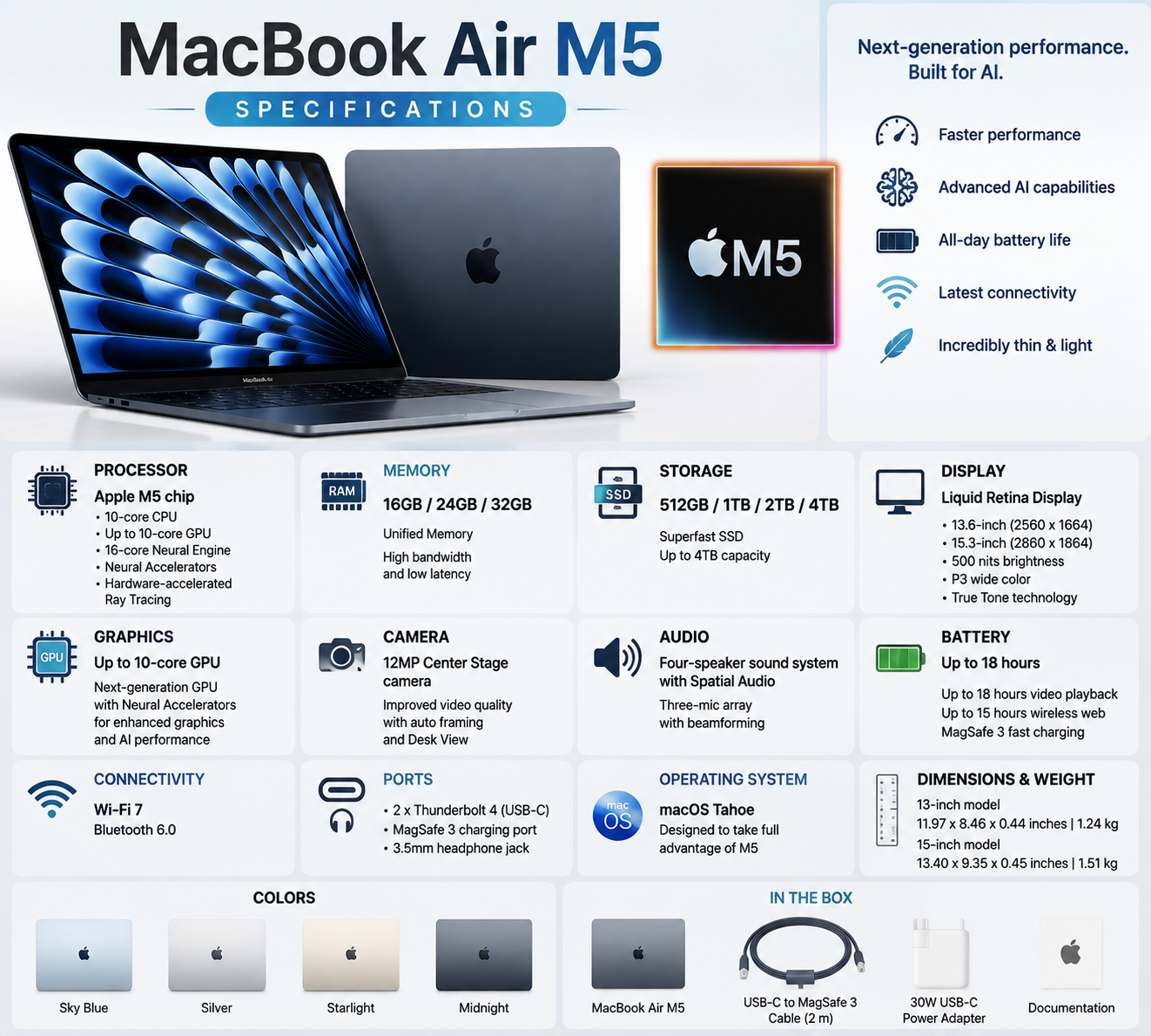
| Feature | MacBook Air M5 |
|---|---|
| Processor | Apple M5 |
| CPU | 10-core CPU |
| GPU | 8-core or up to 10-core GPU |
| Neural Engine | 16-core |
| Memory | 16GB / 24GB / 32GB |
| Storage | 512GB / 1TB / 2TB / 4TB |
| Display | Liquid Retina |
| Sizes | 13-inch and 15-inch |
| Camera | 12MP Center Stage |
| Wi-Fi | Wi-Fi 7 |
| Bluetooth | Bluetooth 6 |
| Ports | 2 × Thunderbolt 4, MagSafe 3, 3.5mm headphone jack |
| External Displays | Up to two |
| Battery | Up to 18 hours |
| Operating System | macOS Tahoe |
| Colours | Sky Blue, Silver, Starlight, Midnight |
Apple’s official technical specifications confirm the M5’s 10-core CPU, up-to-10-core GPU, 16-core Neural Engine, 153GB/s memory bandwidth and configurable memory and storage options.
Design and Build Quality
The MacBook Air has always been known for its premium design, and the M5 generation continues that approach.
The aluminium construction gives the laptop a premium appearance while keeping it thin and portable. The completely fanless design is another major advantage because there is no traditional cooling fan constantly running during normal workloads.
This makes the MacBook Air M5 particularly attractive for:
- Students
- Office professionals
- Business executives
- Writers
- Bloggers
- Digital marketers
- Data analysts
- Programmers
- Travellers
- Content creators
The 13-inch model is the better choice for maximum portability, while the 15-inch model provides more screen space for multitasking.
Both models are available in Sky Blue, Silver, Starlight and Midnight.
MacBook Air M5 Display
The MacBook Air M5 uses Apple’s Liquid Retina display technology.
The display is one of the laptop’s strongest features for everyday productivity and entertainment.
It is suitable for:
- Web browsing
- Writing articles
- Watching YouTube
- Photo editing
- Video editing
- Business presentations
- Excel work
- Power BI dashboards
- Programming
- Online meetings
The 13-inch model is particularly convenient for people who travel frequently. The 15-inch model is more comfortable for users who frequently work with multiple windows.
13-inch vs 15-inch MacBook Air M5
Choose 13-inch if:
- You travel frequently
- Portability is your priority
- You work in cafes or small spaces
- You want a smaller laptop bag
- You prefer a compact laptop
Choose 15-inch if:
- You want a larger workspace
- You regularly use Excel or multiple applications
- You edit photos or videos
- You don’t want to carry an external monitor
- You prefer a bigger screen
MacBook Air M5 Performance Review
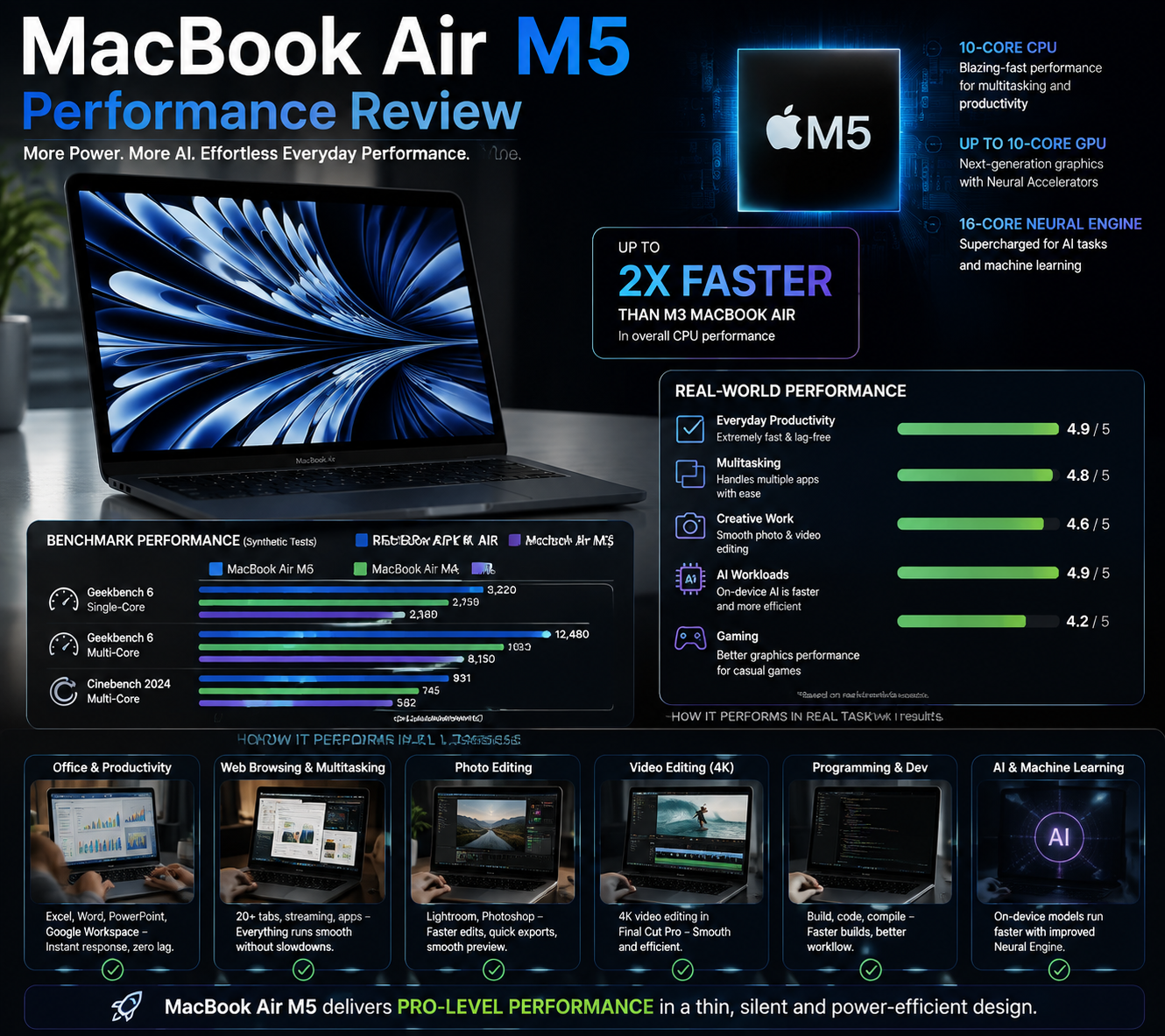
Performance is one of the biggest reasons to consider the MacBook Air M5.
The M5 features a 10-core CPU and up to a 10-core GPU, along with a 16-core Neural Engine. The chip also includes hardware-accelerated ray tracing and Neural Accelerators designed to improve AI-related workloads.
For normal productivity, the MacBook Air M5 is more than powerful enough.
Everyday Performance
The laptop handles tasks such as:
- Microsoft Office
- Google Chrome
- Safari
- Zoom meetings
- YouTube
- WordPress
- Canva
- Photoshop
- Coding
- Large spreadsheets
- Multiple browser tabs
- Content writing
- Basic video editing
with ease.
The M5’s unified memory architecture also helps applications share system resources efficiently.
Apple states that the M5 provides 153GB/s memory bandwidth, a 28% increase over M4.
MacBook Air M5 for Content Creation
The MacBook Air M5 is not a MacBook Pro replacement, but it is surprisingly capable for many creative workloads.
It can handle:
- Photo editing
- 1080p video editing
- 4K video editing
- YouTube content creation
- Graphic design
- Social media content
- Podcast production
- Light 3D work
Apple reports significant improvements in applications such as Topaz Video, Blender and Affinity compared with previous-generation MacBook Air models.
However, if your professional workflow involves long-duration rendering, complex 3D projects or sustained heavy workloads, the MacBook Pro is a better choice because it is designed for higher sustained performance.
MacBook Air M5 for AI
AI is one of the most important reasons the M5 MacBook Air is interesting in 2026.
The M5 includes a 16-core Neural Engine, while its GPU includes Neural Accelerators designed for AI workloads.
The MacBook Air M5 can be used for:
- Apple Intelligence
- AI writing tools
- Image generation
- Photo enhancement
- AI-assisted coding
- Local AI applications
- LLM experimentation
- AI-powered productivity applications
- Speech and language processing
Apple says the M5 MacBook Air can deliver up to four times faster AI performance than the M4 MacBook Air in its stated testing scenarios.
Apple Intelligence
Apple Intelligence is integrated into macOS and supports features such as writing assistance, Genmoji, Image Playground, intelligent Siri capabilities and other AI-powered experiences.
Apple’s current macOS feature availability page lists multiple Apple Intelligence features, although availability can vary by region and language.
For people who want a laptop capable of running modern AI applications without depending entirely on cloud processing, the M5 platform is particularly appealing.
MacBook Air M5 Battery Life
Battery life is another major strength.
Apple rates the MacBook Air M5 for up to 18 hours of battery life.
Actual battery life will depend on:
- Screen brightness
- Browser usage
- Video playback
- AI workloads
- Video editing
- Number of applications running
- Wi-Fi usage
- External displays
- Background processes
Independent testing also places the MacBook Air M5 among the strongest battery-life laptops in its class, with Tom’s Guide reporting more than 15 hours in its testing methodology.
Battery Verdict
Excellent for everyday users.
If you regularly work away from a power socket, the MacBook Air M5 is one of the better premium laptop choices available in 2026.
MacBook Air M5 Camera and Audio
Apple has upgraded the camera experience with a 12MP Center Stage camera.
This is particularly useful for:
- Zoom meetings
- Google Meet
- Microsoft Teams
- Online classes
- Business meetings
- YouTube calls
- Video conferencing
The system also includes a three-microphone array and speakers supporting Spatial Audio and Dolby Atmos.
For professionals who regularly attend online meetings, this is a valuable improvement.
Ports and Connectivity
The MacBook Air M5 includes:
- Two Thunderbolt 4 ports
- MagSafe 3 charging
- 3.5mm headphone jack
- Wi-Fi 7
- Bluetooth 6
It can also support up to two external displays.
The biggest weakness: limited ports
This is still one of the MacBook Air’s disadvantages.
If you frequently connect:
- USB drives
- SD cards
- HDMI displays
- Ethernet
- Multiple accessories
you may need a USB-C hub or docking station.
MacBook Air M5 Price in India
At launch, Apple priced the:
- 13-inch MacBook Air M5: ₹1,19,900
- 15-inch MacBook Air M5: ₹1,44,900
Education pricing was lower at launch.
Apple’s current store listings should be checked before publishing or purchasing because configurations, promotions and pricing can change. Apple’s store currently lists MacBook Air from ₹1,49,900 on its general Mac shopping page, while individual M5 configuration pages can show different prices depending on configuration and offers.
Important Buying Tip
Don’t compare only the laptop’s headline price.
Also compare:
- RAM
- SSD capacity
- GPU configuration
- Charger
- Bank offers
- No-cost EMI
- Exchange value
- AppleCare+
- Student/education pricing
- Warranty
- Seller reputation
A lower-priced configuration is not necessarily the best value if you later need more storage or memory.
Which MacBook Air M5 Configuration Should You Buy?
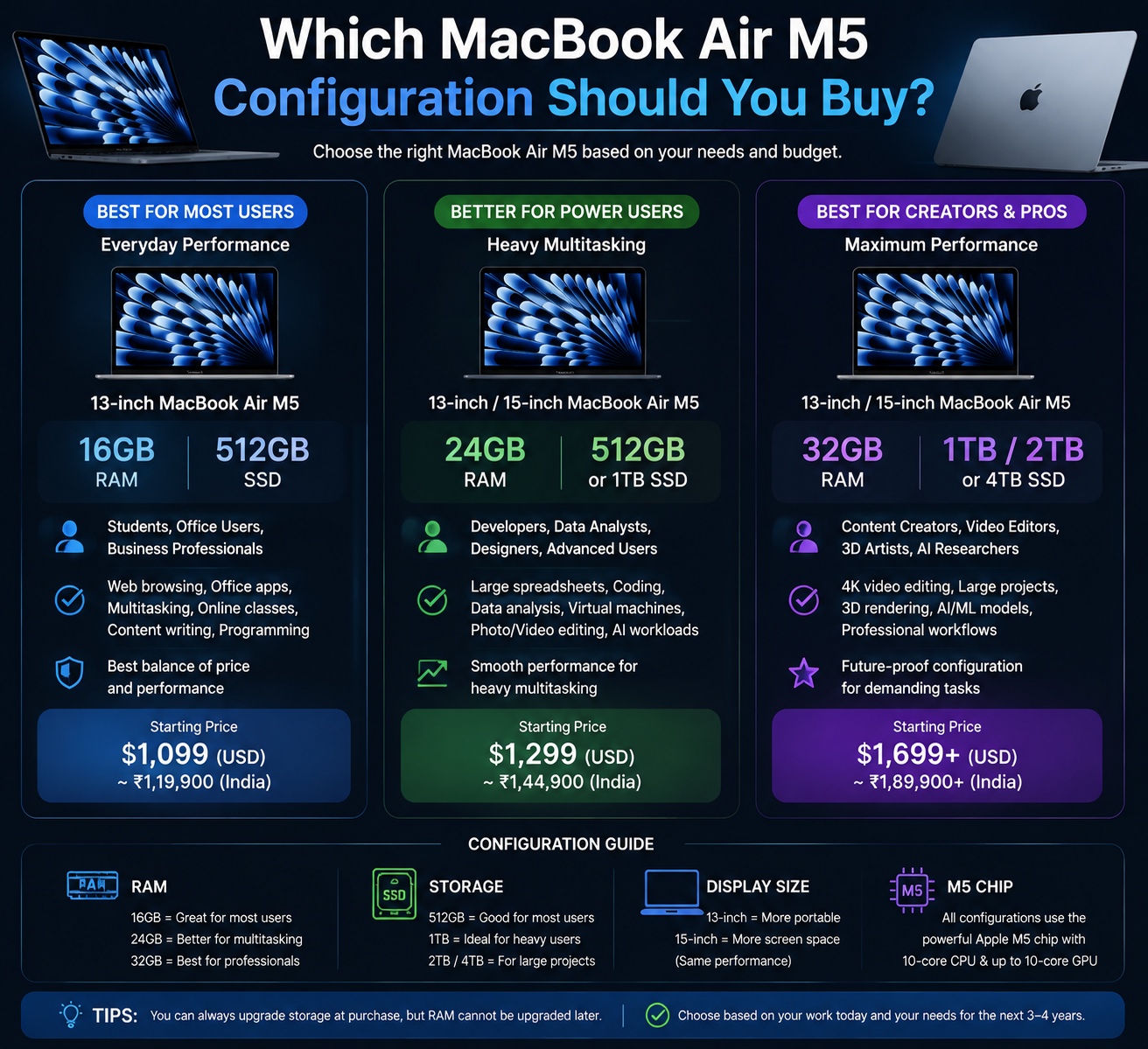
For most users, the 16GB RAM + 512GB SSD configuration is a sensible starting point.
For students
16GB + 512GB
Excellent for:
- Classes
- Research
- Office applications
- Browsing
- Programming
- Presentations
For professionals
24GB + 512GB/1TB
Better for:
- Multitasking
- Data analysis
- Programming
- Business applications
- Large spreadsheets
- AI applications
For creators and advanced users
24GB/32GB + 1TB or more
Consider this if you work with:
- Large video projects
- Professional photography
- Large datasets
- AI applications
- Development environments
- Multiple professional applications
MacBook Air M5 Pros and Cons
Pros
- Excellent M5 performance
- Strong AI capabilities
- Excellent battery life
- Silent fanless operation
- Premium aluminium construction
- Lightweight and portable
- Excellent Liquid Retina display
- 12MP Center Stage camera
- Wi-Fi 7
- Bluetooth 6
- 512GB starting storage
- Up to 32GB unified memory
- Up to 4TB SSD
- Support for two external displays
- Strong Apple ecosystem integration
- Excellent choice for students and professionals
Cons
- Expensive compared with many Windows laptops
- Limited physical ports
- RAM and SSD are not user-upgradable
- Not designed primarily for serious gaming
- macOS may not support every Windows application
- Higher configurations become very expensive
- Heavy sustained workloads are better suited to MacBook Pro
- Some AI features depend on software, region, language or server availability
- Accessories such as hubs and additional storage can increase the total cost
MacBook Air M5 for Gaming: Is It Good?
The MacBook Air M5 is not primarily a gaming laptop.
Its GPU has hardware-accelerated ray tracing, and the M5 platform is considerably more capable than older MacBook Air generations.
However, serious PC gamers should still consider a Windows gaming laptop with a dedicated NVIDIA or AMD GPU.
MacBook Air M5 is good for:
- Casual gaming
- Apple Arcade
- Supported Mac games
- Light-to-moderate gaming
It is not ideal for:
- Competitive gaming
- Large AAA gaming libraries
- High-refresh-rate gaming
- Maximum graphics settings
- Gaming-focused workloads
If gaming is your number-one priority, don’t buy the MacBook Air M5 just because its processor is powerful.
MacBook Air M5 for Students
The MacBook Air M5 is an excellent student laptop.
It is particularly suitable for:
- Engineering students
- MBA students
- College students
- Programming students
- Design students
- Business students
- Research students
- Online learners
Its combination of portability, battery life and performance makes it easy to carry between home, college and work.
Students should also check Apple’s education pricing before purchasing. Apple provides education pricing through its Education Store.
MacBook Air M5 for Business Professionals
Business users are another major target audience.
The laptop is suitable for:
- Sales managers
- Business managers
- Entrepreneurs
- Consultants
- Marketing professionals
- Financial professionals
- Analysts
- Freelancers
- Bloggers
- Digital marketers
For users who work with Excel, browser applications, presentations, emails, CRM software and data-analysis tools, the M5 Air provides more than enough performance.
However, Windows may be the better choice if your company relies heavily on Windows-specific enterprise software.
MacBook Air M5 for Data Analytics
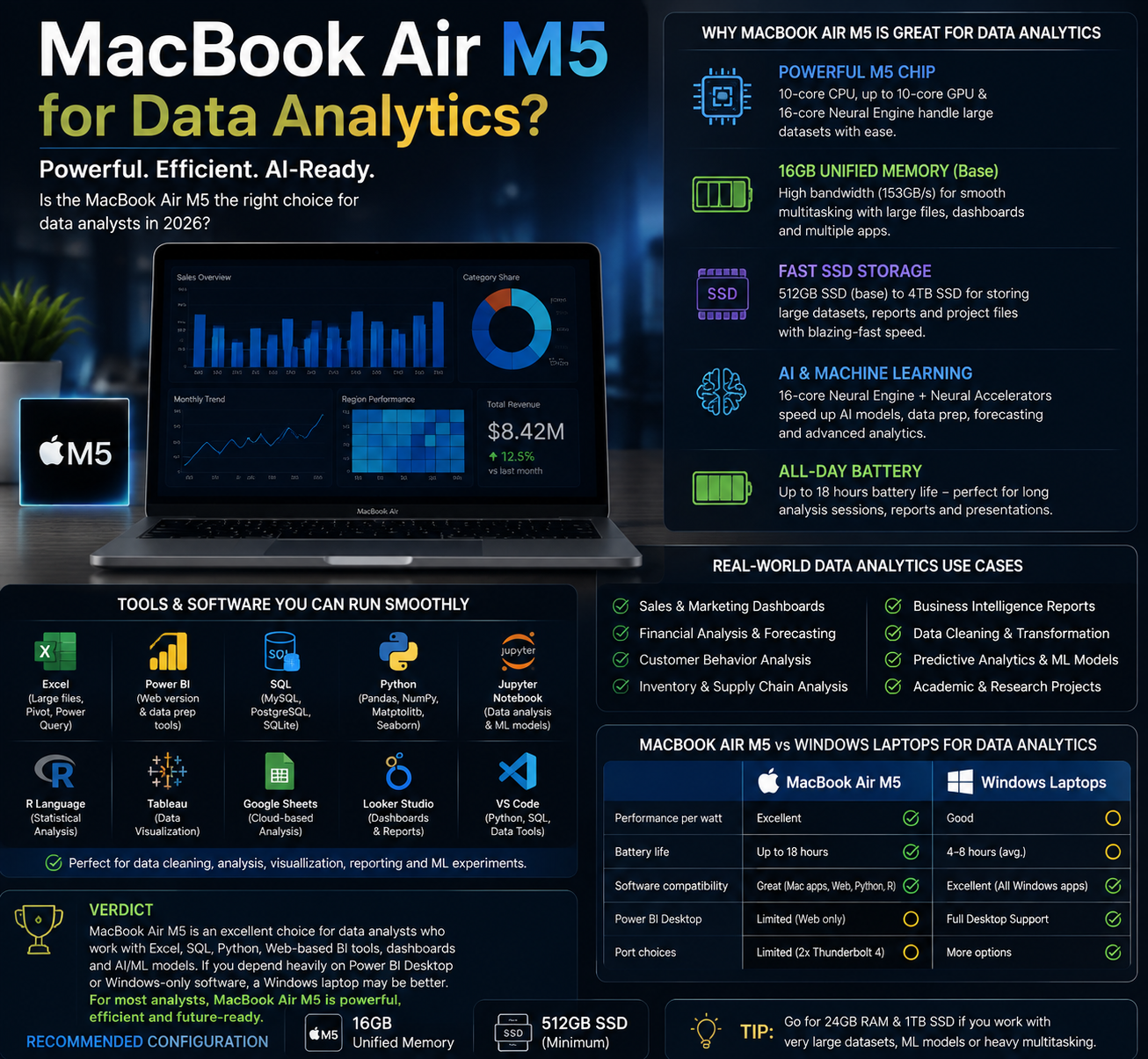
For data analysts, the MacBook Air M5 is powerful enough for many workflows.
It can handle:
- Excel
- SQL
- Python
- Jupyter Notebook
- Power BI alternatives
- Data visualization tools
- Browser-based analytics platforms
The M5’s AI and CPU performance also make it interesting for Python-based AI and machine-learning experimentation.
However, Microsoft Power BI Desktop is primarily a Windows application, so users who depend heavily on the full Power BI Desktop experience should verify software compatibility before switching from Windows.
This is an important consideration that many MacBook reviews overlook.
Should You Buy MacBook Air M5 Online?
Yes, buying online can be convenient, but choose the seller carefully.
Advantages of online purchase
- Easy price comparison
- Bank discounts
- No-cost EMI offers
- Exchange offers
- Home delivery
- Wider configuration choices
- Easy access to customer reviews
Disadvantages
- You cannot physically inspect the laptop before purchase
- Delivery damage is possible
- Seller reputation matters
- Marketplace listings can have confusing configurations
- Return/replacement policies differ by seller
For a high-value purchase like a MacBook, always check the exact model, RAM, SSD, seller, warranty and return policy before payment.
For the safest direct purchase, you can check the official Apple India online store.
Should You Buy MacBook Air M5 Offline?
Yes. For many first-time MacBook buyers, offline purchasing can actually be a better experience.
Advantages of offline purchase
You can:
- See the display personally
- Test the keyboard
- Test the trackpad
- Compare 13-inch and 15-inch models
- Check colours
- Ask questions
- Understand macOS before buying
- Get assistance with setup
This is particularly useful if you have never used macOS before.
Apple Store vs Authorised Reseller vs Multi-Brand Showroom
This is an important question when buying an expensive laptop.
1. Apple Store / Apple Online Store
Best for: Maximum confidence and direct Apple support.
Buying directly from Apple gives you access to Apple’s retail experience, setup assistance and Apple support ecosystem. Apple states that customers buying directly from Apple Retail can receive Personal Setup assistance.
Advantages
- Direct Apple purchase
- Official pricing
- Apple trade-in options
- Personal Setup
- AppleCare+ options
- Specialist assistance
- Strong after-sales ecosystem
Best choice for:
First-time Mac buyers and buyers who prioritise peace of mind.
2. Apple Authorised Reseller / Premium Apple Retailer
This can also be a very good option.
Apple says MacBook Air M5 models are available through Apple Stores and Apple Authorised Resellers.
A reputable authorised reseller can sometimes provide:
- Local store service
- Demonstration units
- Bank offers
- EMI options
- Exchange deals
- Business billing
- Faster local purchasing
Before purchasing, verify that the retailer is genuinely authorised and confirm the warranty details.
3. Multi-Brand Showroom
A multi-brand electronics showroom can be useful if you want to compare the MacBook Air M5 against Windows laptops at the same time.
You can compare:
- MacBook Air M5
- Windows AI laptops
- OLED laptops
- Business laptops
- Gaming laptops
- 2-in-1 laptops
Advantages
- Compare multiple brands
- Compare specifications
- Physical demonstration
- Local negotiation may be possible
- EMI and exchange offers may be available
Disadvantages
The salesperson may have incentives to promote a particular brand or model.
Therefore, don’t buy solely based on a salesperson’s recommendation.
My Buying Recommendation: Where Should You Buy?
Best overall choice
Apple Store / Apple Online Store
Choose this if you want maximum confidence, direct support and a straightforward purchase experience.
Best for local support and offers
Reputable Apple Authorised Reseller
Choose this if you find a genuine authorised retailer offering a better bank, exchange or EMI deal.
Best for comparing brands
Reputable Multi-Brand Showroom
Choose this if you are still deciding between MacBook Air M5 and Windows laptops.
My advice
Do not choose a seller only because the price is ₹5,000–₹10,000 lower.
For a premium laptop, seller authenticity, warranty, invoice, configuration and after-sales support are more important than a small price difference.
Is MacBook Air M5 Worth Buying in 2026?
Yes — for the right user.
The MacBook Air M5 is particularly worth buying if you want a premium, lightweight laptop that combines strong performance, excellent battery life, AI capabilities and a mature software ecosystem.
The M5 upgrade also makes the MacBook Air more interesting for AI-focused users because Apple has added Neural Accelerators to the GPU architecture and increased memory bandwidth.
It is also currently being recognised by major laptop guides as one of the strongest overall laptop choices in 2026. Tom’s Guide has ranked the MacBook Air M5 as a leading overall laptop and its 13-inch model as a top ultraportable.
Who Should Buy the MacBook Air M5?
Buy it if you are:
- A student
- A business professional
- A blogger
- A programmer
- A content creator
- A digital marketer
- A frequent traveller
- An iPhone user
- Someone who values battery life
- Someone who wants a silent laptop
- Someone interested in AI applications
- Someone looking for a premium long-term laptop
Who Should NOT Buy It?
Think twice if you:
- Need Windows-only applications
- Want serious gaming performance
- Need many built-in ports
- Need user-upgradable RAM
- Need user-upgradable storage
- Perform extremely heavy rendering every day
- Want the lowest possible laptop price
For these users, a Windows laptop or MacBook Pro may provide better value.
MacBook Air M5 vs MacBook Pro: Which One?
Choose the MacBook Air M5 if portability, battery life, everyday performance and value are your priorities.
Choose the MacBook Pro if you need:
- More sustained performance
- More powerful GPU configurations
- Professional video production
- Advanced 3D workloads
- Heavy software development
- High-end creative workflows
- More professional connectivity
In other words:
MacBook Air M5 = performance + portability + efficiency
MacBook Pro = maximum sustained professional performance
Final Verdict
The Apple MacBook Air M5 Review 2026 comes down to one simple conclusion: Apple has created a highly capable premium laptop for users who want performance without sacrificing portability.
The M5 chip provides powerful CPU and GPU performance, while the 16-core Neural Engine and Neural Accelerators make the laptop well suited to the growing AI-focused computing environment.
Battery life is excellent, the fanless design is silent, the display is high quality, and the 13-inch and 15-inch choices make it easier to select the right size.
The biggest drawbacks are the price, limited ports, lack of user-upgradable memory/storage and compatibility considerations for Windows-only software.
Final Score
| Category | Rating |
| Design | ⭐⭐⭐⭐⭐ |
| Performance | ⭐⭐⭐⭐⭐ |
| AI | ⭐⭐⭐⭐⭐ |
| Battery Life | ⭐⭐⭐⭐⭐ |
| Display | ⭐⭐⭐⭐⭐ |
| Portability | ⭐⭐⭐⭐⭐ |
| Camera | ⭐⭐⭐⭐½ |
| Connectivity | ⭐⭐⭐⭐ |
| Gaming | ⭐⭐⭐½ |
| Value for Money | ⭐⭐⭐⭐½ |
| Overall | ⭐ 4.7/5 |
Bottom Line
If you want one premium laptop for work, study, business, content creation, programming and everyday AI-powered productivity in 2026, the MacBook Air M5 is one of the strongest choices available.
For most buyers, I would recommend starting with the 13-inch MacBook Air M5 with 16GB unified memory and 512GB SSD. If you regularly work with large files, heavy multitasking or professional creative applications, consider moving to 24GB or 32GB memory and 1TB storage.
Before buying, compare Apple’s current price with authorised-reseller and reputable multi-brand-store offers, but don’t compromise on authenticity, warranty or after-sales support for a small discount.
Frequently Asked Questions
Is the MacBook Air M5 worth buying in 2026?
Yes. It is one of the strongest premium ultraportable laptops available in 2026, particularly for productivity, business, education, programming, content creation and AI-assisted workflows.
What is the MacBook Air M5 price in India?
The M5 MacBook Air launched in India at ₹1,19,900 for the 13-inch model and ₹1,44,900 for the 15-inch model. Current prices can vary by configuration, promotions and retailer.
Does MacBook Air M5 have Apple Intelligence?
Yes. Apple Intelligence is integrated into the Mac experience, with supported features varying according to software version, language and region.
How long does the MacBook Air M5 battery last?
Apple rates it for up to 18 hours, although real-world battery life depends on workload and settings.
Is MacBook Air M5 good for students?
Yes. Its combination of portability, battery life and performance makes it an excellent student laptop.
Is MacBook Air M5 good for gaming?
It can handle supported games, but it is not a dedicated gaming laptop. Serious gamers should consider a Windows gaming laptop with a dedicated GPU.
Should I buy the MacBook Air M5 online or offline?
Both are good options. Buy directly from Apple or a reputable authorised reseller for maximum confidence. An offline showroom is particularly useful if you want to physically test the laptop before purchasing.
Apple Store or multi-brand showroom — which is better?
For maximum purchase confidence, the Apple Store is the safest straightforward option. A genuine authorised reseller can also be excellent, especially if it offers a better local deal. A multi-brand showroom is useful when you want to compare the MacBook against Windows laptops.
Is 16GB RAM enough for MacBook Air M5?
For most students, office users, writers, business professionals and general users, 16GB is a good starting point. Users working with heavy multitasking, large datasets or professional creative applications should consider 24GB or 32GB.
Author’s Recommendation
Recommended: ⭐⭐⭐⭐⭐
Best for: Students, professionals, business users, programmers, bloggers, creators and AI-focused users.
Best configuration for most users: 13-inch + 16GB unified memory + 512GB SSD
Best for larger-screen productivity: 15-inch MacBook Air M5
Best buying route: Apple Store/Apple Online Store or a verified Apple Authorised Reseller
Think twice if: You are a serious gamer, require Windows-only software or need maximum sustained professional performance.
Overall verdict: Highly Recommended for 2026.
Sources & Further Reading
For the most accurate specifications and current pricing, check Apple’s official pages before publishing the article because prices and configurations can change:


One thought on “Apple MacBook Air M5 Review 2026: Performance, Battery Life, AI, Price & Is It Worth Buying?”